
Ever asked ChatGPT to rewrite a tricky message, used Notion AI to summarize a doc, or let Reclaim auto-schedule your tasks? Then you’ve already felt the power of AI Assistants in action.
AI assistants are built to quietly handle the routine tasks: drafting emails, summarizing docs, managing your calendar, or responding to routine messages. Therefore, you can focus on high-value works. That means spending more time on strategy, creative problem-solving, or connecting with your team, things that move projects forward.
The best part? You don’t have to settle for off-the-shelf tools. You can build your own AI assistant tailored to your role, your team, and your workflow.
This guide will walk you through how AI assistants work, what they’re capable of, and how to build the right one for your workflow.
An AI Assistant is a software system powered by artificial intelligence (often LLMs – large language models) that helps users complete tasks, answer questions, or make decisions, usually through natural language (text or voice). They work across systems, offering a conversational interface to backend tools.
Below are some of their defining characteristics:
AI assistants work by combining several smart technologies to understand what you ask and respond with the right action. They interpret your words, connect to the tools you use, and learn from your behavior. This lets them do tasks like booking meetings or writing emails with minimal input from you.
Here are the key technologies that make this possible:
For example, if you say, “Book a meeting next week,” the AI assistant processes your request using natural language understanding. It then checks your calendar, finds an available slot, and schedules the meeting automatically. Based on your habits, like preferred times or people, it can suggest smarter options without needing extra input.
AI assistants and AI agents both share the goal of reducing manual effort and streamlining workflows. However, they differ significantly in their levels of autonomy and decision-making capabilities. You can think of AI assistants as a simpler form—or subset—of AI agents. While assistants are typically reactive, task-specific, and designed for direct user interaction, agents are more autonomous and goal-driven.
Below, you can see a visual comparison of how AI assistants and AI agents differ across key dimensions.
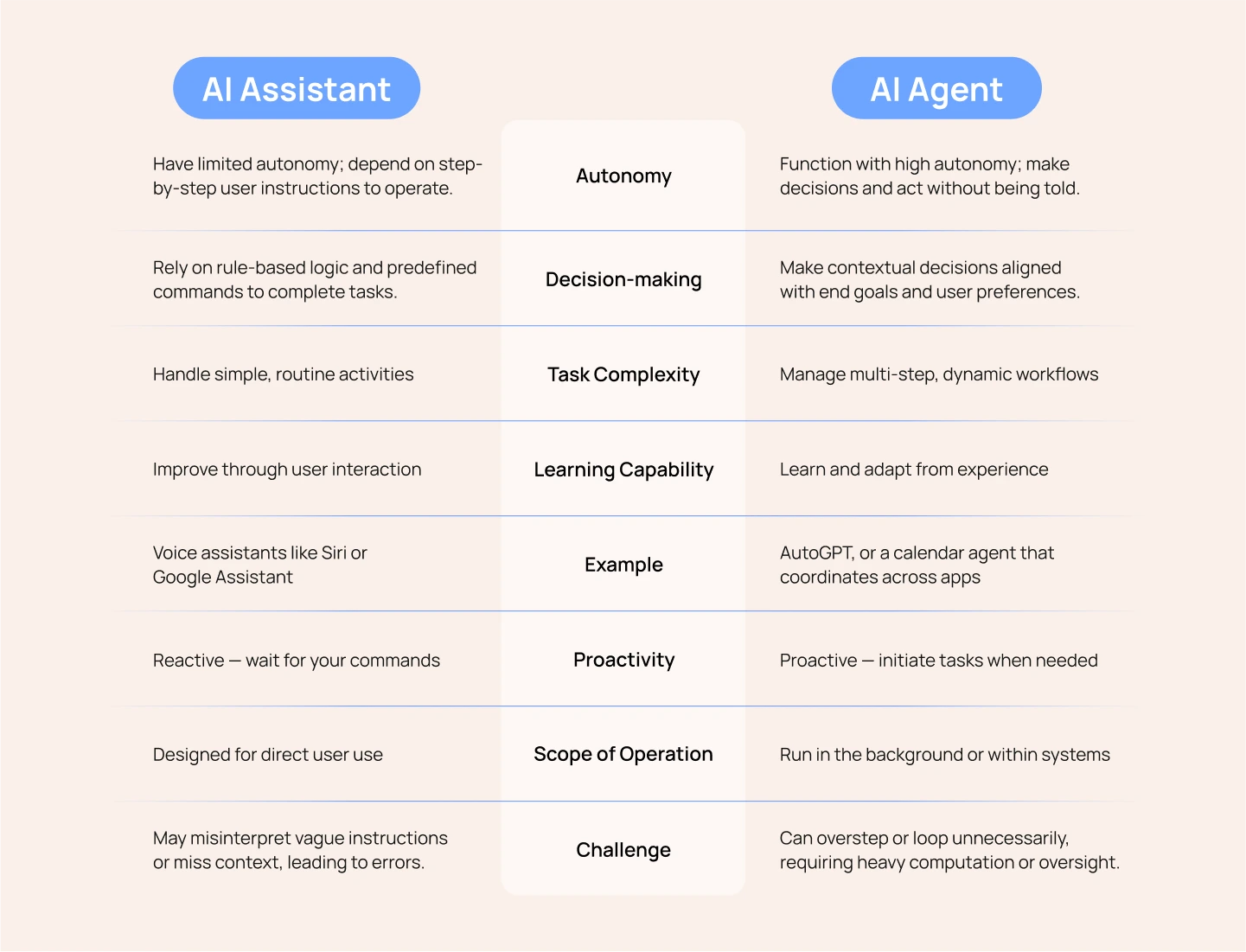
To put it simply, the image highlights how AI assistants are best for small, clearly defined tasks, like asking ChatGPT to write a headline or using Siri to set a timer. You give the instruction, and they respond.
AI agents can make decisions and coordinate across tools or even collaborate with other agents. It can accomplish more complex, multi-step objectives, all with minimal human input. For example, a schedule agent might scan your availability, contact attendees, reschedule meetings, and send reminders, without you needing to step in at every stage. This difference in autonomy is key to choosing the right tool for your workflow.
AI assistants aren’t made to serve everyone the same way; they’re designed to handle different tasks based on user needs. Some are built to write and edit content, while others specialize in scheduling, research, shopping, or technical support. Each assistant works differently, depending on the use case and the tools it connects with.

Below are the main types of AI assistants and how they’re used in everyday life:
AI writing assistants help users create content faster and with less effort. These tools support grammar correction, tone adjustments, and can even generate complete drafts based on short prompts.
Tools like ChatGPT, GrammarlyGO, and Jasper analyze what you type and offer suggestions to improve clarity, tone, or structure. Marketers and content creators use them to draft emails, write blog posts, and craft social media content, making their writing more consistent and efficient.
AI scheduling assistants take over the tedious task of finding the right time for meetings and balancing your calendar. Instead of manually checking availability or sending multiple emails, these tools handle everything for you.
Tools like Motion and Reclaim use AI to scan your calendar, predict task durations, and auto-schedule meetings in your free time. Team leads and managers save hours each week by automating scheduling, reducing email clutter, and avoiding missed appointments.
AI personal assistants are general-purpose tools that help with day-to-day life, both at home and at work. They’re especially helpful when you need hands-free or voice-activated support.
These tools like Siri, Alexa, and Google Assistant, can answer questions, set reminders, send messages, or manage smart home devices. Busy professionals use them to stay organized, check the weather on the go, control their calendar with voice commands, and reduce mental load.
AI work assistants are designed to streamline routine tasks across your workplace so you can focus on more strategic work. These tools help you manage meeting notes, update project tasks, and reduce the burden of documentation.
Notion AI and ClickUp’s AI assistant, for example, automatically generate meeting summaries, assist in daily planning, and manage to-do lists. Tech and operations teams commonly use them to minimize repetitive admin tasks and keep project workflows moving smoothly.
AI coding assistants help developers write high-quality code more efficiently. They provide real-time suggestions, complete code automatically, and explain complex logic when needed.
GitHub Copilot and Amazon CodeWhisperer provide smart code suggestions and auto-completions as you type. They also offer helpful documentation tips, all directly within tools like Visual Studio Code or IntelliJ—code editors used by developers. These assistants reduce time spent on boilerplate code, help spot bugs early, and allow developers to stay focused on logic instead of syntax.
AI research assistants sift through large volumes of information to surface relevant insights. They save time on reading and help synthesize complex topics quickly.
Elicit and Perplexity AI are research-focused assistants that help users explore complex topics. They summarize academic papers, find evidence-backed answers, and generate research outlines to speed up deep-dive analysis. As a result, they’re widely used in research-heavy fields like academia, journalism, and market analysis.
AI shopping assistants are tools that help users discover products more easily and shop smarter. They use AI to recommend items, compare prices, and notify shoppers about deals.
For example, Klarna’s AI assistant and Google Shopping AI are tools that help users discover products more efficiently. They analyze your browsing habits to suggest items, compare prices, and help you find the best deals with less effort.
Creating an AI assistant today is no longer limited to developers! As a product manager, designer, or AI enthusiast, you can build powerful assistants using no-code tools and open AI models. However, making a truly useful assistant requires more than just plugging in a chatbot. It begins with identifying and solving a real, meaningful problem for yourself or your users.
Here’s a step-by-step guide to help you build your own assistant:
Before diving into tools or models, get clear on what your AI assistant is meant to do. Instead of building a generalist that handles many tasks poorly, focus on a single high-impact use case. Think about your biggest pain point. What repetitive task do you wish someone (or something) could do for you?
Examples might include sorting job applications based on skill match, drafting meeting summaries from call recordings, or flagging negative reviews in app store feedback.
A clearly defined purpose makes your assistant easier to test, faster to launch, and more likely to succeed. It’s like hiring a specialist: the narrower the scope, the better the performance.
How to do this:
Prioritize by Impact: Choose tasks that are high frequency, clearly defined, and easy to validate with automation.
Choosing the right LLM is crucial to ensure your assistant performs effectively and aligns with your specific task. Each model is built differently, so matching the LLM’s strengths to your needs helps avoid issues like slow responses, poor accuracy, or excessive costs.
Also consider:
How to do this:
Evaluate Results Side-by-Side: Run the same prompt across models and see which output is clearest, fastest, and most useful for your needs.
You might want to read more about: Driving AI Visibility in Search with Smart LLM Optimization
Think about where and how you want to interact with your assistant. Will it live in your Slack workspace, Notion dashboard, or inside your website? For mobile work, maybe it should respond via voice.
A seamless interface helps you adopt it more naturally and use it in your daily workflow.
How to do this:
To make your assistant truly useful, it needs access to the right systems, your CRM, Notion docs, Google Calendar, support tickets, or databases. This allows it to go beyond chatting and actually do things.
How to do this:
Once your assistant is live, treat it as a work in progress. Test it in real conditions, gather usage data, and refine it continuously. Early runs will expose gaps, unexpected inputs, and improvements you might not predict during design.
How to do this:
AI assistants are no longer futuristic tools; they’re already embedded in how we live and work. Whether you’re a student, business owner, or developer, there’s an AI assistant tailored to your goals. With smart integration and thoughtful use, these assistants can significantly boost your efficiency and innovation potential.
At Lollypop Design Studio, we help forward-thinking teams bring their AI-powered products to life through world-class UI/UX design. If you’re building a virtual assistant or intelligent platform, we’d love to support you.
As a globally recognized design agency, we specialize in crafting intuitive, engaging, and scalable digital experiences that transform emerging technologies into everyday tools people love to use.
Building an AI assistant is not just about choosing the right model or integrations—it’s also about creating an experience users actually enjoy interacting with. A clear interface, intuitive conversation flow, and thoughtful UX design can make AI assistants feel more natural, helpful, and trustworthy. Platforms like Spot by Lollypop help businesses explore and build AI-powered digital experiences that balance intelligence with usability.

It depends on your needs. ChatGPT is ideal for writing, summarizing, and general productivity. GitHub Copilot is purpose-built for software developers, helping them write and understand code more efficiently. Claude works well with long documents, while Gemini can pull in real-time information from the web.
First, identify the tasks you want help with: writing, research, coding, scheduling, or data lookup. Then compare model strengths, platform support (like Slack or mobile), tool integrations, and pricing tiers.
AI assistants can occasionally generate incorrect or misleading information, especially when the prompt is vague or the context is missing. They may lack awareness of recent events unless connected to real-time data. Human oversight is essential in high-stakes areas like finance, law, or healthcare. Privacy can be a concern, especially if the assistant handles sensitive or proprietary information, and connecting them to internal tools may require technical setup and security review.





