
When building a product from the ground up, it’s easy to believe that users will just “get it” — that they’ll understand your design the way you envision it. But what feels intuitive to you can often leave your users scratching their heads, frustrated, or even ready to abandon your product altogether.
If you’re getting user feedback that your product is confusing or prone to errors, it’s a clear sign that your design needs some attention. A great way to uncover usability issues and gain valuable insights is by conducting a Heuristic Evaluation (HE).
But what exactly is Heuristic Evaluation UX design? What are its pros and cons? And how can you conduct one effectively? Let’s dig into these key questions and discover the answers through this blog!
Heuristic evaluation is a thorough assessment used to identify usability issues in a product’s user interface (UI). During the process, usability experts (evaluators) analyze the interface based on established usability principles, known as “heuristics.” This approach is widely used in user-centered design to create intuitive, efficient, and user-friendly products.
Several sets of heuristics are commonly referenced:
Among these, 10 Usability Heuristics principles by Jakob Nielsen (1994) is the most widely used framework due to its simplicity in identifying usability problems across interfaces. However, other methods are also preferred for specialized contexts, such as interfaces with high cognitive demands, advanced interactions, or complex design requirements.
Businesses can consider conducting heuristic evaluations in various stages:

Like any research and design method, heuristic evaluation comes with its own set of advantages and disadvantages. Let’s take a closer look at some of them:
A study on Usability Heuristics found that 43% of the UX issues identified through the Usability Heuristics principles are not actual errors. To overcome this limitation, UX experts often combine the 10 Usability Heuristics with Usability Testing, which involves observing users interacting with the product, tracking their behavior and interaction times, and collecting direct feedback.
So, how do these methods differ in ways that allow them to complement each other? Let’s explore!
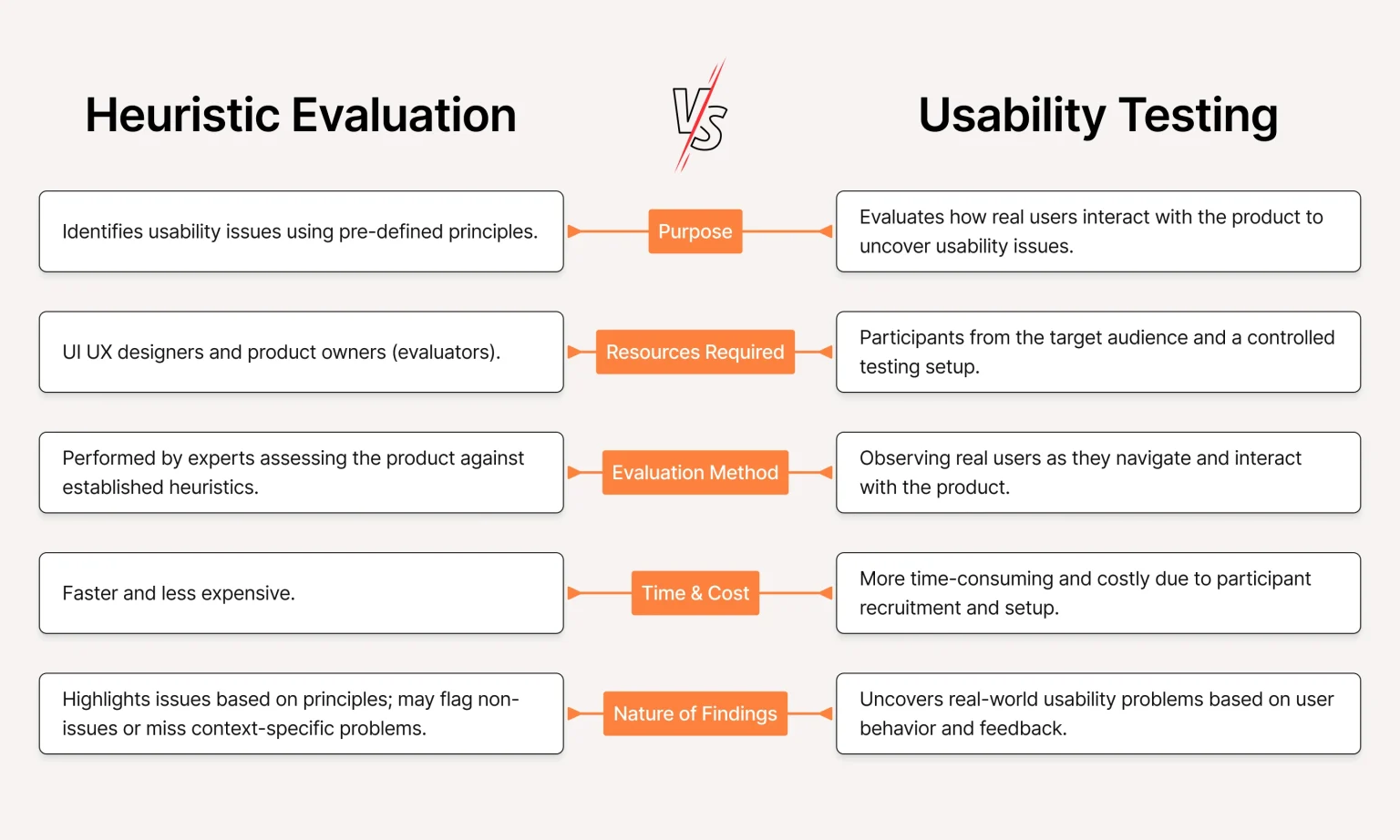
1. Purpose
Heuristic evaluation focuses on identifying usability issues by assessing a product against a set of pre-defined principles, such as Jakob Nielsen’s usability heuristics. In contrast, usability testing evaluates how real users interact with the product, aiming to uncover usability issues based on actual behavior.
Heuristic evaluation involves 3–5 UI/UX experts (evaluators) reviewing the product against established principles to identify issues. Usability testing, on the other hand, requires recruiting real users from the target audience and setting up a controlled environment to observe and analyze their interactions.
In heuristic evaluation, experts perform an independent review of the product, assessing its design elements against a checklist of usability principles. This process is based on their professional judgment rather than direct user input.
Usability Testing, however, involves observing real users as they navigate and interact with the product. Participants are given specific tasks to complete, and their actions, errors, and feedback are recorded to identify usability barriers.
Since Heuristic evaluation does not involve participant recruitment or testing logistics, the process can be completed quickly, often in a few hours or days. Conversely, usability testing is more time-consuming and costly due to the need to recruit appropriate participants, set up testing scenarios, and analyze user data.
Heuristic evaluation highlights issues based on design principles, which makes it effective at identifying general usability flaws. However, it may also flag non-issues or fail to capture problems that are specific to the context of real-world use.
Usability testing, on the other hand, uncovers usability problems grounded in actual user behavior and feedback. It provides a more accurate representation of how the product performs for its intended audience, including unique issues that might not be apparent to experts conducting a heuristic evaluation.
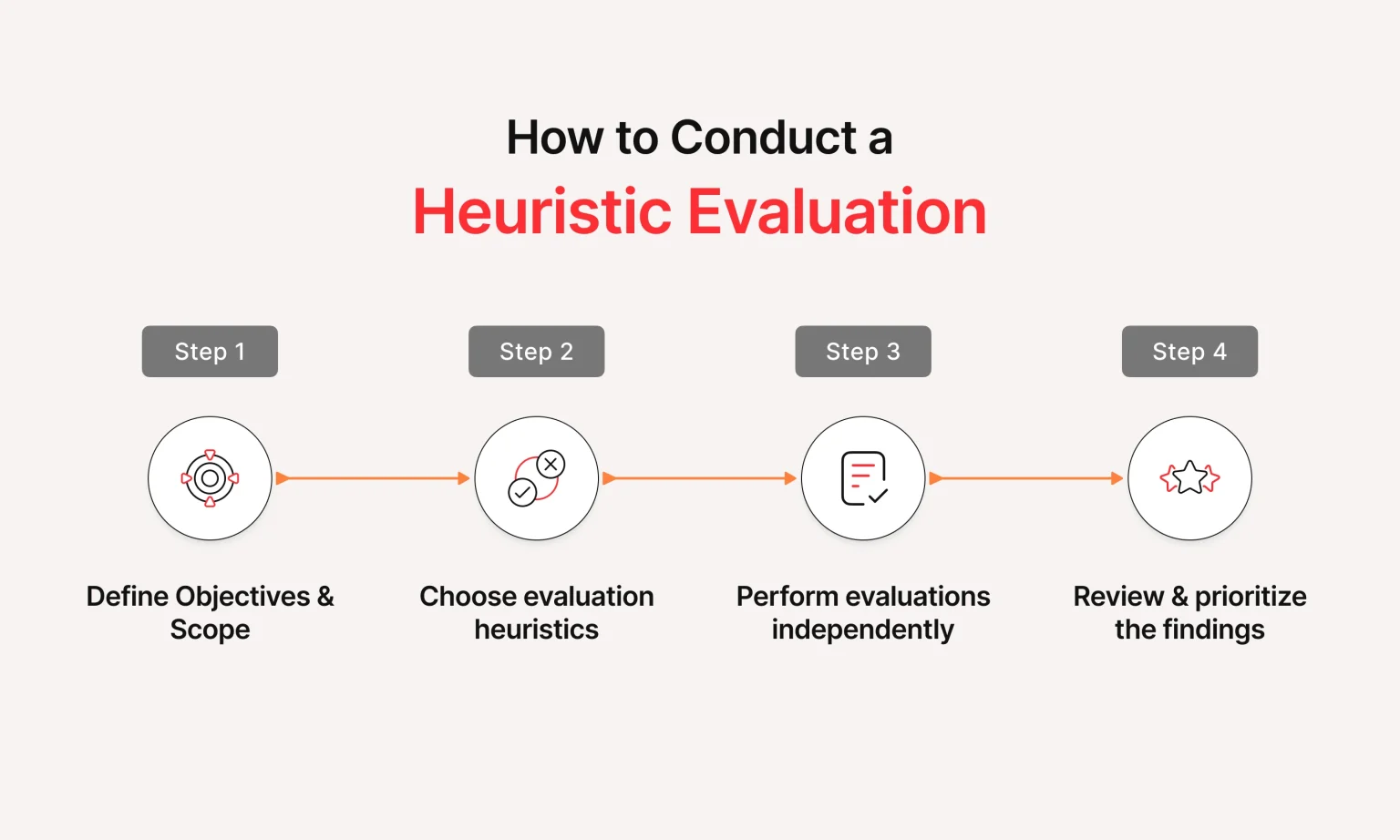
Conducting a heuristic evaluation is a straightforward and cost-effective way to identify usability issues in your product. In this guide, we’ll walk you through the essential steps to perform a successful evaluation, helping you enhance your product’s user experience and ensure it aligns with best practices.
The first step in a heuristic evaluation is to define its purpose and boundaries. Here’s how:
To select the appropriate set of heuristics in design, you might start with Nielsen’s Usability Heuristics (1994), a widely recognized framework known for its simplicity, broad applicability, and strong research foundation. heuristic evaluation Nielsen
However, while Nielsen’s heuristics are versatile, they may not always be the ideal choice. In certain cases—such as systems with high cognitive demands or advanced interactions—specialized frameworks like Shneiderman’s 8 Golden Rules or Gerhardt-Powals’ 10 Cognitive Principles may provide better alignment with the product’s specific needs.
While you decide on the Heuristics, keep in mind:
During this step, evaluators independently perform a thorough review of the product’s interface, identifying usability issues based on the selected heuristics. Each evaluator should assess the interface individually to ensure a diverse range of observations is captured, free from the influence of groupthink
Whenever an issue is identified, record the following details:
Example: An evaluator might identify that after a user submits a contact or registration form, there is no confirmation to indicate whether the submission was successful or not. This lack of feedback leaves users uncertain about the outcome of their actions, violating the heuristic of “visibility of system status”. As a result, users may become frustrated and potentially repeat the submission or abandon the form altogether.
Once the evaluators have completed their assessments, it’s time to bring the team together to consolidate and analyze the findings. Methods like affinity mapping can be used to organize the issues on a whiteboard, helping to identify recurring problems and structure them.
During this phase, the team should focus on the following:
For each identified issue, propose solutions that align with usability principles, distinguishing between short-term fixes (quick adjustments) and long-term solutions (more significant redesigns). Prioritize actions based on available resources and timelines.
Finally, ensure all findings are well-documented in a heuristic evaluation report and shared with relevant stakeholders to maintain alignment and clarity across the team.
Read More: The Role of Branding in UI/UX Design: A Complete Guide
Use this checklist to quickly review a website or digital product against Nielsen’s usability principles:
☐ Does the interface clearly communicate system status?
☐ Does the language match users’ expectations?
☐ Can users undo or cancel actions?
☐ Are navigation and interface patterns consistent?
☐ Does the design prevent common user errors?
☐ Can users recognize options without remembering information?
☐ Are shortcuts available for frequent tasks?
☐ Is unnecessary content or visual clutter removed?
☐ Are error messages clear and actionable?
☐ Can users easily find help when they need it?
For each issue you identify, record the screen or workflow, violated heuristic, description of the problem, user impact, severity, and recommended improvement. This turns a simple checklist into a practical evaluation report.
A checklist should support the evaluation, not replace expert judgment. Heuristic evaluation still depends on evaluators interpreting the interface and understanding the product context.
Lollypop approaches heuristic evaluation as part of a broader UX improvement process. Our UX experts review critical user journeys against established usability principles, identify usability issues, assess their severity, and translate findings into actionable design recommendations.
Depending on the product and project goals, the evaluation can focus on areas such as navigation, onboarding, forms, search, checkout, dashboards, or other high-impact workflows. The findings are documented and prioritized so product teams can focus on the issues that have the greatest impact on users and business goals.
Heuristic evaluation is a highly efficient method for identifying usability issues, particularly when time or budget is constrained. It delivers expert insights to optimize your digital product from a professional, human-centered design perspective.
If you’re seeking a thorough assessment of auditing your website or app, the design experts at Lollypop Design Studio are here to help. As a leading UI/UX design company, we offer comprehensive UX audit solutions to enhance your product’s usability and user experience across digital platforms.
Contact us today to discuss a tailored UX audit process designed to meet your unique needs and goals!
Heuristic evaluation is performed by UX experts who assess an interface against usability principles, while usability testing involves observing real users completing tasks. Heuristic evaluation is faster and useful for identifying potential problems early, while usability testing provides evidence from actual user behavior.
A team of around three to five independent evaluators is commonly recommended because different evaluators can identify different usability issues.
It can be conducted during early design, before launch, during iterative improvements, or when a product has known usability concerns.
Yes. A checklist based on Nielsen’s heuristics can help teams perform an initial review. However, experienced evaluators can provide deeper findings and reduce the risk of overlooking usability problems or misinterpreting issues.
No. A heuristic evaluation is one method for identifying usability problems by reviewing an interface against specific principles. A UX audit is broader and may combine heuristic evaluation with analytics, accessibility reviews, competitive analysis, usability testing, and other methods. This distinction is also made in current UX guidance.