
AI agents are changing how people interact with software. Instead of navigating multiple screens and completing every step themselves, users can delegate goals and let an AI system work across connected tools. But when an agent starts making decisions and taking actions independently, a new design challenge emerges: how do users stay informed and in control?
A chat interface alone cannot answer that question. Users need to understand what an agent plans to do, which actions require permission, how far a task has progressed, and what happens when something fails.
| Quick Answer: What is good AI agent UX design?
Good AI agent UX design gives users control over delegated tasks through clear execution plans, risk-based approvals, visible progress, and actionable recovery options. It helps users understand what an agent is doing, intervene when necessary, and verify the outcome without supervising every individual step. |
AI agent UX design focuses on how people delegate, monitor, and control tasks performed by AI agents. Unlike traditional software, where users carry out most actions themselves, agents can plan tasks, use connected tools, observe results, and adjust their approach within defined permissions.
The distinction matters:
| Design Dimension | Traditional App UX | Chatbot UX | Agent UX |
| User input | Clicks, forms and navigation | Questions and prompts | Goals and constraints |
| System behaviour | Predetermined workflows | Conversational responses | Multi-step task execution |
| User’s role | Performs actions | Guides conversations | Delegates and supervises |
| Main interface priority | Navigation and usability | Conversation clarity | Visibility, control and recovery |
| Output | Screens and records | Text or generated content | Results, completed actions and task updates |
An AI agent may use one or several tools, operate in the background, or request information before proceeding. It does not necessarily need to be fully autonomous. Its level of independence depends on the task, permissions, and system design.
This makes agentic UX design less about creating another conversational interface and more about designing a complete experience around delegation and supervision.
Users should understand what an agent is being asked to achieve, what it can access, and where its authority ends. A clear delegation experience prevents misunderstandings before they turn into execution errors.
Consider an enterprise user asking an agent to research five software vendors, compare them against company requirements, create a shortlist, and draft outreach emails to the top two.
Before starting, the interface should establish three things.
A broad instruction such as “Find the best vendors and contact them” leaves too much room for interpretation.
The interface should help users specify:
These details give the agent a clearer task and help users understand what they have delegated.
Before execution, display the sequence of actions the agent intends to perform.
For example:
Users should be able to edit the plan, change its scope, or cancel it. This is especially important when a task involves several connected applications or external actions.
Explain which systems the agent can access and which actions it can perform. Reading a document, editing a record, and sending an external email should not be treated as equivalent permissions.
Clear permission boundaries help users understand the agent’s capabilities without assuming that access to a tool automatically means authorization to perform every action within it.
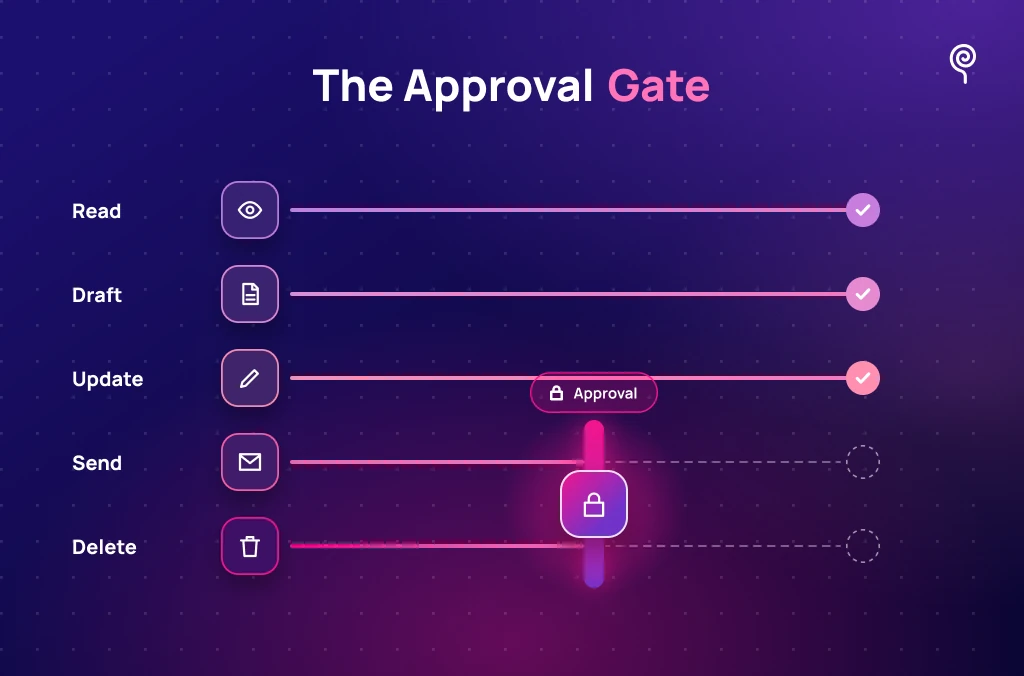
An AI agent should request approval before actions that carry significant consequences, affect external systems or people, exceed granted permissions, or require a decision that should remain with the user.
Asking for approval at every step creates friction. Allowing unrestricted execution creates risk. The design challenge is to apply the right level of control to each action.
Approval requirements should reflect the action’s potential impact and reversibility.
| Action | Example | Recommended UX |
| Read-only | Search vendor documentation | Proceed within granted permissions |
| Preparation | Draft a comparison report | Show the result for review |
| Data modification | Update a business record | Apply scoped approval rules |
| External communication | Send vendor emails | Require explicit approval |
| High-impact action | Delete production records | Require strong confirmation and safeguards |
A useful principle is to let agents handle routine, authorized work while placing meaningful checkpoints around consequential actions.
A generic “Are you sure?” dialog does not give users enough information to make a good decision.
An effective approval screen should explain:
For the vendor scenario, the approval card should display the two email recipients, message previews, and sending accounts. The user should be able to edit, approve, or decline each message.
Use specific action labels such as “Send these two emails” instead of vague buttons such as “Continue”.
Repeated approval requests can interrupt work and encourage users to approve without reviewing. Human-in-the-loop UX should therefore be based on risk and context, not on the number of steps in a workflow.
Designers can reduce unnecessary interruptions through:
An approval must apply to the action the user actually reviewed. If the recipients, amounts, records, or other consequential details change, the interface should request renewed authorization.
A reliable agent experience makes execution visible and treats failure as a normal system state. Users should know what has happened, what is happening now, and what they can do next.
A generic “Thinking…” message provides little information during a long-running task. A progress interface should communicate verified actions and current task status.
Useful states include:
| Agent State | What the User Should See |
| Planned | The agent has prepared its task sequence |
| In Progress | The current action and completed steps |
| Waiting for Approval | The action requiring user authorization |
| Blocked | The issue preventing further execution |
| Partially Completed | Completed work and outstanding steps |
| Completed | Verified outcome and task summary |
| Failed | What could not be completed and available recovery options |
Prefer concrete milestones such as “Reviewed 3 of 5 vendors” over arbitrary percentages. A percentage suggests measurable progress, so it should only appear when the system can calculate it meaningfully.
AI agents may continue working after a user leaves the current screen. The interface should make it possible to return and understand the latest task state without starting again.
A persistent status panel or activity history should show:
These controls must have distinct meanings. Closing a panel should not unexpectedly stop a background task. Pausing should suspend further execution, while stopping should clearly explain what happens to actions already completed.
A single failed step should not automatically erase successful work.
For example, suppose the agent reviews four of five vendors but cannot access the final vendor’s pricing page. It should retain the four completed reviews, identify the missing information, and explain what the user can do next.
Useful recovery options might include:
This approach makes partial completion visible rather than presenting an entire workflow as unsuccessful.
Not every failure requires the same response.
Repeatedly retrying an action that requires new credentials or user input does not improve the experience. It only leaves users waiting.
An effective AI agent error handling experience answers three questions:
For example:
Generic message: “Operation failed. Error 500.”
Useful message: “The fifth vendor’s pricing page could not be accessed. Four vendor reviews are complete. You can retry the source, provide another link, or continue with the available results.”
The second message identifies the issue, preserves context, and gives the user a decision.
Depending on the failure, the interface should offer the appropriate recovery path:
A particularly important case occurs when an external request times out after it may already have been submitted. For example, an email service might receive a message but fail to return confirmation.
A “Retry All” button could send the same email twice. The safer design is to check the external system’s current status first, reconcile the result, and retry only when the original action is confirmed not to have occurred.
Recovery should preserve completed work and make the next action explicit.
Testing should evaluate more than whether an agent completes a task successfully. It should establish whether users understand its actions, recognize risks, and recover when execution does not go as planned.
Use realistic scenarios to check whether users can:
Include interrupted workflows, permission failures, and uncertain outcomes. Testing only the successful path leaves important design problems undiscovered.
Useful measures include:
| Metric | What It Reveals |
| Task completion rate | Whether delegated tasks reach their intended outcome |
| Approval comprehension | Whether users understand what they approve |
| Unintended-action rate | Whether the agent acts outside user expectations |
| Recovery success rate | Whether users can resolve failures |
| Time to recovery | How quickly users return to a workable state |
| Unnecessary interruption rate | Whether approval requests create avoidable friction |
| Human handoff resolution | Whether users can successfully take over blocked tasks |
Interpret these measures together. Fewer approval requests, for example, are not necessarily an improvement if unintended actions increase.
An AI agent becomes useful when users can delegate work without losing control of its execution. Clear task plans, meaningful approval checkpoints, observable progress, and reliable recovery paths make that possible.
For product teams, the priority is not simply to increase agent autonomy. It is to design the right level of autonomy for each task and give users the information and controls to supervise it.
Planning an AI-powered product experience? Discuss your project with Lollypop.
Chatbot UX focuses primarily on conversations and responses. AI agent UX also needs to support task delegation, multi-step execution, connected tools, approval decisions, background progress and error recovery.
An agent should request approval when an action has significant consequences, affects external systems or people, exceeds granted permissions, or requires explicit user consent. The approval should explain the action and its impact.
Use visible task states, completed milestones, current activity, pending approvals, and blockers. Provide a persistent activity history so users can return later and understand what happened. Use completion percentages only when they reflect measurable progress.
Only when the system supports reversal for that action. Some changes can be rolled back using saved states or undo operations, while external actions such as sent emails or completed payments may not be reversible. The interface should explain these limitations before execution.