

Most UX teams do not struggle to run research; they struggle to make it usable.
Insights often sit in decks, Notion pages, or scattered reports that rarely influence product decisions. By the time findings reach stakeholders, the context has been diluted, or the opportunity has passed. The bottleneck is not effort; it is how quickly and clearly research can be translated into action.
AI in user research is starting to change how this workflow operates. Not by replacing researchers, but by reducing the time spent on processing and structuring information. Tasks like transcription, tagging, clustering insights, or drafting reports can now be completed in a fraction of the time, allowing teams to focus on interpreting what actually matters.
A large majority of UX researchers are already using AI in some part of their workflow, with rapid growth over the past year. What is changing is not the purpose of research, but how it moves from raw data to decision-making. The work that remains critical is still human, understanding nuance, identifying patterns that matter, and connecting insights to business priorities.
This guide breaks down how AI fits into user research in practice, where it delivers real value, where it falls short, and what it means for UX teams trying to scale research without losing depth.
AI in user research refers to using artificial intelligence to plan, conduct, analyze , and synthesize research more efficiently. It reduces the time needed to turn raw data into usable insights, without changing the core methodology.
In traditional research, much of the effort goes into operational tasks like transcription, note organisation, and manual analysis. AI handles these steps faster by automating transcription, suggesting themes, and generating early synthesis.
However, AI does not replace the researcher. It cannot decide what questions to ask, interpret subtle user behavior, or determine which insights matter in a business context. Those decisions still rely on human judgment.
In practice, teams use AI mainly for writing-heavy tasks such as summarising interviews and structuring reports. Its role is clear: improve speed and scale in execution, while leaving interpretation and strategy to humans.
AI in user research fits into the standard UX research workflow, but its role is different in each stage. Some steps benefit from strong automation, while others still depend heavily on human judgment.

The 6 phases below show how AI is actually used in practice.
At the beginning of a research project, teams define what they need to learn, which users to study, and how the research will be conducted. This step shapes everything that follows. If the scope is unclear or the questions are weak, the data collected later will not be useful.
AI UX research tools support planning by analysing past studies, suggesting relevant research questions, identifying likely user segments, and recommending suitable methods. Instead of starting from a blank page, researchers begin with a structured draft and refine it based on context. This improves the quality of the research setup while reducing time spent on initial structuring.
Once the research plan is defined, teams need to recruit participants who accurately represent the target audience. The quality of research depends heavily on who is included. Poor recruitment leads to misleading insights, even if the study is well designed.
AI UX research tools help by analysing demographic, behavioural, or product usage data to match participants with screening criteria. They can quickly filter large datasets and suggest suitable candidates. However, decisions around participant quality, diversity, and edge cases still require human judgment, especially when nuance matters.
In this phase, researchers run interviews, usability tests, or observations to understand user behavior in context. The key challenge is balancing 2 things at once: engaging with the participant and capturing accurate data.
AI UX research tools assist by transcribing conversations in real time, tagging speakers, and surfacing key moments or quotes during the session. This reduces the need for manual note-taking and allows researchers to stay focused on the interaction. As a result, both data quality and interview depth improve.
After data collection, researchers review transcripts, notes, and recordings to understand what users actually experienced. This step is critical because early observations influence how insights are interpreted later. Missing signals at this stage often lead to incomplete or biased analysis.
AI in user research accelerates this process by scanning large volumes of data and highlighting recurring topics, unusual patterns, and key signals. Instead of manually going through every line, researchers can quickly identify where to focus their attention. This makes the review process faster while still preserving important context.
This is the core of UX research, where raw data is transformed into insights that inform decisions. Researchers group related observations, identify patterns, and connect them to user needs, pain points, and opportunities.
AI in user research supports this by clustering similar responses, identifying themes, and revealing relationships across data points. It provides a structured starting point for analysis. However, interpreting those patterns, prioritising insights, and linking them to business impact still relies on human expertise.
After insights are defined, the next step is to turn them into clear deliverables that guide product decisions. This ensures teams can act on research instead of just reading it.
The first key deliverable is the problem statement, which defines what needs to be solved based on research findings. It helps align product, design, and business teams before moving forward.
AI in user research supports this step by validating whether the problem aligns with user needs, business goals, and product KPIs, helping refine it so it stays focused and actionable.
From there, teams create deliverables such as empathy maps, user personas, user journey maps, competitive analysis, SWOT analysis, and design audits. AI in user research helps structure these outputs, identify patterns, and generate early drafts, while researchers refine them to ensure accuracy and relevance.
At this stage, research moves into design and development. With clear problems and structured insights, teams can build solutions that better match real user needs.
While most discussions around AI in user research focus on improving individual workflows, the bigger shift is happening at the operational level. ResearchOps is about making research consistent, reusable, and scalable across teams.
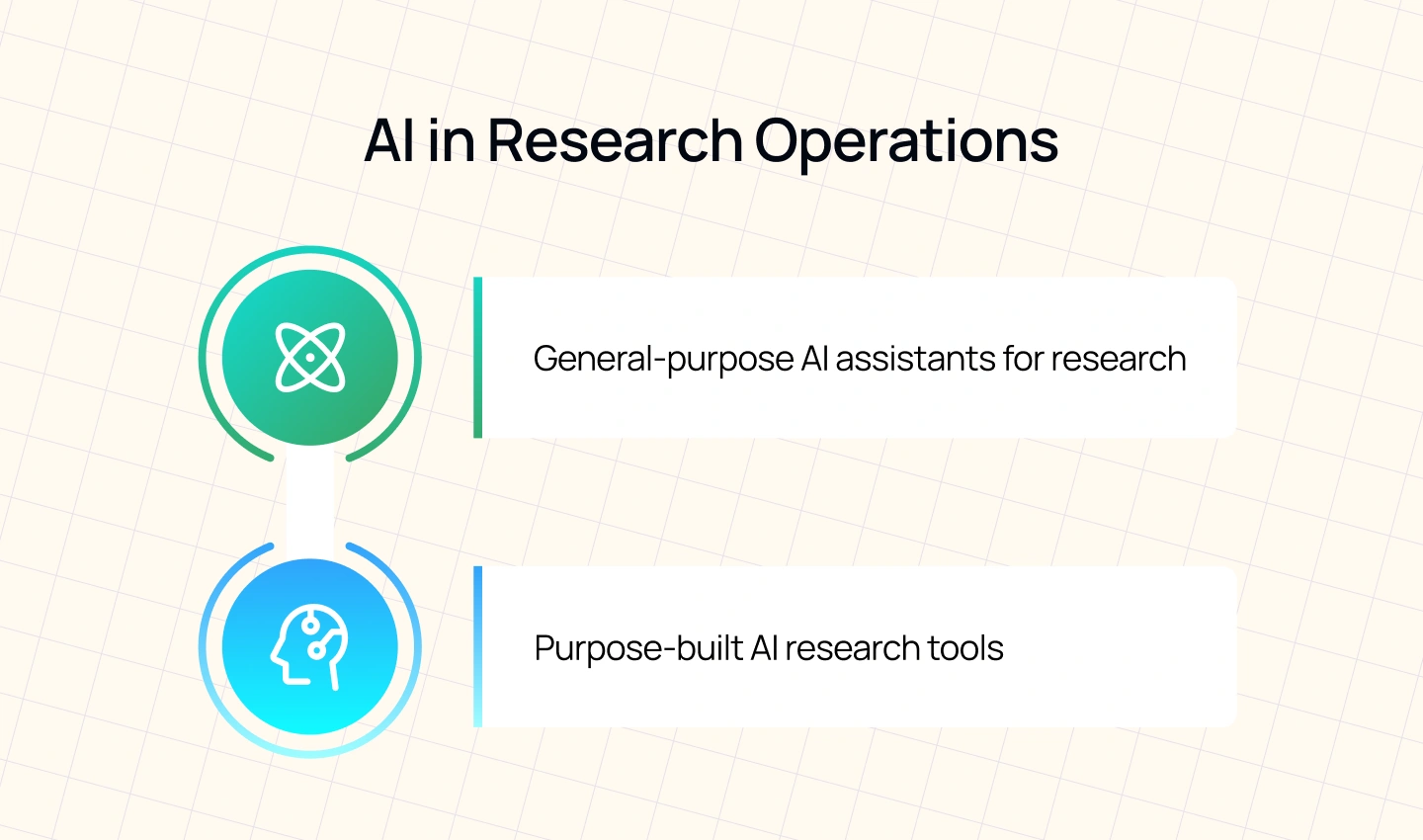
AI assistants now play 2 distinct roles in enabling that:
General-purpose AI assistants are flexible tools that support a wide range of research tasks, from drafting discussion guides to summarising interviews and structuring reports. Teams often use them because they are easy to access and require little setup.
In practice, researchers use these tools to move faster across planning, analysis, and reporting. They can generate first drafts, surface patterns, and help structure thinking without needing a dedicated research platform.
From a ResearchOps perspective, these assistants improve individual efficiency but introduce inconsistency at scale. Different researchers may use different prompts, approaches, or formats, making it harder to standardise outputs across teams.
Example: tools like ChatGPT or Claude can be used to summarize interview transcripts, generate research questions from a brief, or draft initial reports based on raw findings. These tools act as on-demand support across multiple stages of the workflow.
Purpose-built AI research tools are designed specifically for user research workflows. They focus on structured processes such as repository management, participant tracking, and insight organisation.
These tools support research operations by making insights searchable, reusable, and connected across projects. They enable teams to store findings in central repositories, automatically tag insights using shared taxonomies, and match participants across studies.
Unlike general-purpose assistants, these tools are built for consistency. They help organisations avoid duplicated research, maintain a single source of truth, and ensure that insights are accessible across teams.
Example: tools like Dovetail or Thematic allow teams to upload research data, automatically cluster insights, tag themes, and search across past studies. Instead of working in isolated documents, teams can access a shared system of knowledge.
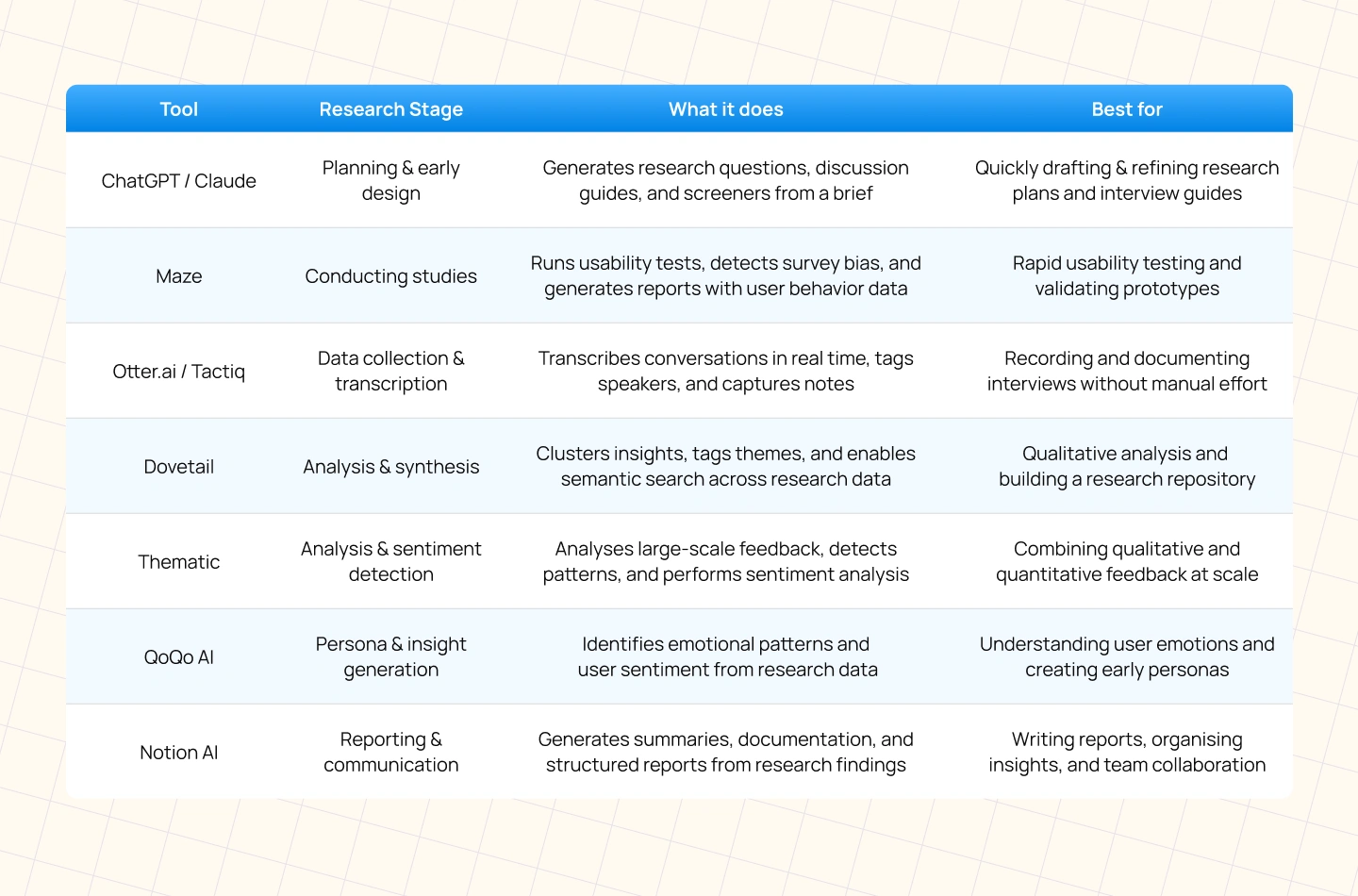
Choosing the right AI UX research tools depends less on features and more on where they fit in your workflow. Different tools are built to support different stages of research, from planning and testing to analysis and reporting. Understanding this mapping helps teams adopt tools more intentionally instead of using AI in a fragmented way.
The table below highlights some of the most effective tools used across the research process, based on where they deliver the most value:
As AI in user research becomes more common across product teams, it is easy to focus only on speed, automation, and efficiency. However, research is not just a process of collecting and organising information. The most valuable parts of research often depend on judgment, interpretation, and human connection, areas where AI still has clear limitations.
Understanding these limitations is important before scaling AI across research workflows. Teams that rely too heavily on automation risk losing the nuance that makes research strategically useful in the first place.
Good user research depends on trust. Participants often reveal their real frustrations, motivations, or uncertainties only when they feel comfortable with the person interviewing them.
AI can support simple moderated interviews, generate follow-up questions, or summarise conversations in real time. However, it cannot notice hesitation, recognize discomfort, or understand what a participant is deliberately avoiding. It also cannot build the kind of rapport that encourages users to speak honestly beyond surface-level answers.
In practice, many of the strongest research insights come from subtle moments: a pause before answering, a contradiction between words and behavior, or a shift in tone when discussing a pain point. These signals are difficult to quantify, but experienced researchers know how to recognize and explore them.
Finding patterns in data is only one part of research. The more difficult task is deciding which findings actually matter in a specific business context.
AI in user research can identify recurring themes, analyze feedback at scale, and surface potential insights. However, it does not have direct awareness of organizational priorities, stakeholder dynamics, product strategy, or internal constraints unless that context is explicitly provided.
This becomes important when interpreting research findings. Some insights may appear emotionally strong or highly recurring, but still have low strategic priority compared to business goals, technical limitations, or market direction.
Researchers interpret findings within a larger organizational context. They decide which problems deserve attention, how insights should be framed for stakeholders, and where trade-offs need to be made. This level of strategic judgment depends on business understanding, experience, and collaboration across teams.
As AI tools become more integrated into research workflows, questions around privacy, consent, and data handling become increasingly important.
Research often involves sensitive information, including recorded interviews, behavioural data, and personal feedback. While AI tools can process this information quickly, they cannot decide whether data collection methods are ethical or whether participants fully understand how their information will be used.
There is also a broader industry issue: many teams are adopting AI faster than they are developing governance standards for it. Clear conversations around AI ethics in UX research are still limited, despite the growing use of these tools.
One of the most valuable research skills is the ability to challenge assumptions and reframe the problem itself.
AI generates outputs based on existing information and recognised patterns. It can suggest interview questions, expand prompts, or improve structure, but it cannot independently rethink the direction of the research.
Senior researchers often create the most impact not by answering the original brief, but by identifying the question that should have been asked instead. They recognise gaps in understanding, uncover hidden assumptions, and redirect conversations toward more meaningful problems.
This kind of thinking is difficult to automate because it depends on curiosity, intuition, and contextual awareness rather than pattern recognition alone.
AI in user research is no longer an emerging practice. Research teams across the industry are already using AI to reduce operational workload, accelerate analysis, and move from raw data to insights more efficiently. What has changed is not the purpose of UX research, but the speed and scale at which teams can execute it.
The strongest impact of AI appears in execution-heavy stages such as planning, transcription, qualitative synthesis, and reporting. At the same time, the areas that define high-quality research, empathy, strategic interpretation, ethical judgment, and problem framing, still depend heavily on human expertise. This balance is what separates meaningful research from automated output.
The same shift is happening beyond individual projects. Generative AI in user research and design thinking is helping teams move faster through the empathise and define stages, while ResearchOps platforms are making research knowledge easier to organise, search, and reuse across teams. Together, these changes are reshaping how research operates inside modern product organisations.
However, the teams seeing the most value from AI are not trying to automate research entirely. They are applying AI deliberately to repetitive operational tasks while protecting the human judgment that makes research strategically useful in the first place.
For many UX teams, a significant amount of research time is still spent on transcription, tagging, and documentation. The AI tools available today can reduce much of that operational effort, allowing researchers to focus more on interpretation, collaboration, and product direction, the work that actually influences decisions.
At Lollypop Design Studio, we help organisations integrate AI into UX research workflows without losing the depth and rigour that strong research requires. If you’re exploring how to scale research more efficiently while maintaining research quality, our team can help you define the right approach for your product and organisation.
We apply the same care when designing AI products themselves – for Asato.ai, we designed an AI co-pilot platform for enterprise CIOs, where an LLM-powered assistant had to feel trustworthy and effortless to use.
AI in user research refers to the use of artificial intelligence to support research activities such as planning studies, transcribing interviews, analysing qualitative data, clustering insights, and generating research deliverables. Its primary role is to improve speed and efficiency while keeping interpretation and strategic decision-making human-led.
Generative AI in user research and design thinking is commonly used to generate discussion guides, summarize interviews, identify themes, draft personas, create empathy maps, and structure reports. It helps researchers reduce manual work and move faster through the early research and synthesis stages.
Some of the most widely used AI UX research tools for qualitative analysis include Dovetail, Thematic, Looppanel, and Notably AI. These tools help researchers transcribe interviews, detect themes, cluster insights, and organise research repositories more efficiently.
No. While AI in user research can automate operational tasks such as transcription, tagging, and early synthesis, it cannot replace empathy, strategic interpretation, ethical judgment, or the ability to reframe research problems. UX research still relies heavily on human understanding, context, and decision-making.





