
Traditional wireframing is not difficult, but it is time-consuming. Even experienced UX designers can spend several hours building the first draft of a single screen before the real product discussions begin. By the time layouts, navigation structures, and content hierarchy are defined, a significant amount of design effort has already gone into work that will likely change multiple times.
An AI wireframe generator changes this dynamic by removing much of the manual setup involved in early-stage interface design. Instead of starting from a blank canvas, teams can generate structured layouts from a text prompt, screenshot, or sketch in minutes.
The value is not just speed. It is the ability to spend more time on UX thinking, interaction logic, usability, and product decisions rather than repeatedly reusing the same foundational UI patterns.
This shift is also changing who can participate in early product ideation. Product managers, founders, and engineering teams can now use an AI-powered wireframe generator to quickly visualize concepts before involving design teams in deeper refinement. For designers, this means fewer hours spent translating rough ideas into basic layouts and more time focused on solving complex UX problems.
For UX designers, product managers, and design leads evaluating this technology, the challenge is no longer whether AI can generate wireframes. The real question is how to use these tools effectively without compromising design quality.
This guide explores how AI wireframe generators work, the different generation methods available today, which tools fit different workflows, and where human UX expertise remains essential in the process.
An AI wireframe generator is a tool that creates UI wireframes from a text prompt, screenshot, sketch, or product description. Instead of manually arranging layouts and interface elements from scratch, teams can generate structured screens within seconds.
Traditional wireframing often takes time because designers need to build the layout foundation before refining the actual user experience. An AI tool to generate wireframes speeds up this early-stage process by automatically generating the first draft. This allows teams to spend more time on UX logic, usability, interaction design, and product decisions instead of repetitive setup work.
Most modern AI app wireframe generator tools work similarly:
Different AI wireframe generator workflows are designed for different stages of product design. Some are better for generating ideas quickly, while others help teams redesign existing interfaces or digitize workshop outputs.
Choosing the right method depends on how your team works and what kind of input you already have.
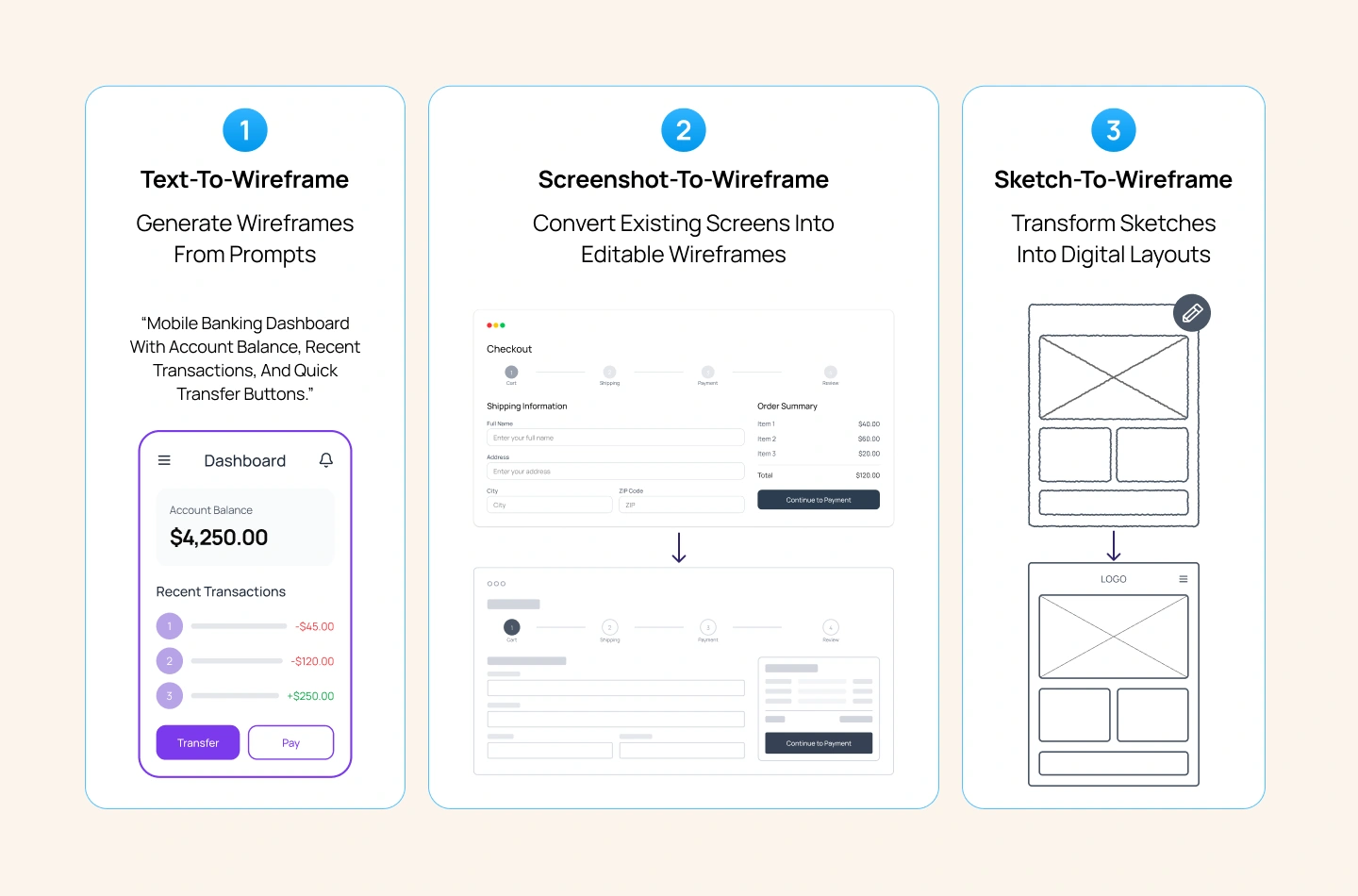
Text-to-wireframe tools generate layouts from plain language prompts. You describe the screen, feature, or user flow, and the AI creates a structured wireframe automatically.
This method works best during early-stage ideation when teams need to explore multiple concepts quickly without designing every screen manually.
Example: A product manager types “mobile banking dashboard with account balance, recent transactions, and quick transfer buttons,” and the AI generates a basic app layout within seconds.
Screenshot-to-wireframe tools convert existing interfaces into editable wireframes. Teams can upload screenshots from their own products, competitor platforms, or design references, and the AI recreates the structure automatically.
This method is useful for redesign projects, competitor analysis, and improving existing workflows without rebuilding layouts from scratch.
Example: A UX team uploads screenshots of an e-commerce checkout flow to quickly recreate the structure before testing new layout improvements.
Sketch-to-wireframe tools turn hand-drawn concepts into digital wireframes. Teams can photograph whiteboard sketches or paper layouts, and the AI converts them into editable screens.
This method works well during workshops, brainstorming sessions, and design sprints where ideas are created quickly offline.
Example: After a sprint workshop, a team photographs whiteboard sketches and converts them into digital wireframes to continue collaboration remotely.
The biggest impact of an AI wireframe generator is not just faster screen creation. It changes how product teams collaborate during the early stages of design.
Instead of spending hours creating low-fidelity layouts manually, teams can move into discussions, iteration, and decision-making much earlier. This shifts design workflows from production-heavy execution toward faster collaboration and refinement.
One of the biggest workflow improvements for designers is reducing the time spent creating repetitive layout foundations. Instead of starting every screen from scratch, designers can begin with an AI-generated structure and focus more on refinement and UX quality.
AI wireframing also helps product managers communicate ideas more clearly during planning and collaboration. Instead of relying only on written briefs, they can quickly create rough visual concepts to support discussions with design and engineering teams.
As product demands grow, many design teams become overloaded with creating first drafts for every feature request. AI-generated wireframes reduce this production bottleneck by helping teams generate initial layouts much faster before refinement begins.
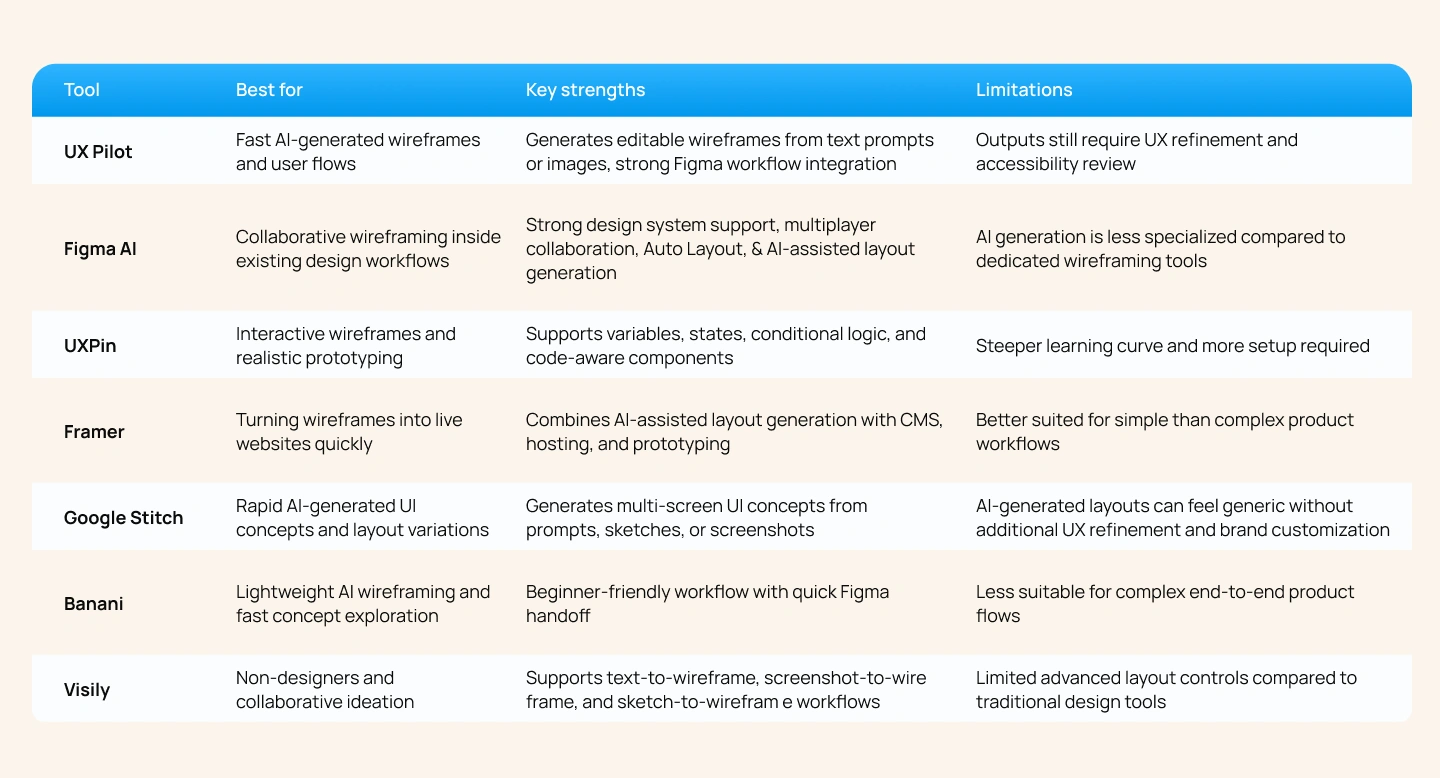
The number of AI wireframe generator platforms has grown rapidly over the past year. However, these tools are not built for the same workflows. Some focus on fast ideation from prompts, while others are designed for collaborative wireframing, prototyping, or production-ready design systems.
Choosing the right tool depends on how your team works, what level of fidelity you need, and whether the goal is exploration, collaboration, or developer handoff.
As more teams adopt an AI wireframe generator, it is easy to focus only on speed and automation. However, wireframing is not just about arranging UI blocks on a screen. Strong wireframes define how users move through a product, how information is prioritized, and how interactions support business goals.
While AI can generate layouts quickly, there are still critical parts of the design process that require human UX expertise.
An AI wireframe generator can create screens based on common UI patterns, but it does not truly understand user intent, behavioral context, or task flow.
Generating a login screen is relatively simple. Designing the full authentication experience is not. Real product workflows involve edge cases such as password recovery, failed login attempts, multi-factor authentication, validation states, and progressive disclosure.
These decisions depend on understanding user behavior and product requirements, not just generating layouts from prompts.
Most AI UI wireframe generator tools focus on layout generation, not accessibility validation.
AI-generated wireframes do not reliably check heading hierarchy, keyboard navigation flow, contrast requirements, touch target sizing, or screen-reader considerations. If accessibility is ignored during wireframing, usability problems often become more expensive to fix later in development.
Accessibility needs to be considered from the beginning of the UX process, not added after screens are generated.
Many AI-generated wireframes rely on generic UI patterns and default interface structures.
However, real products depend on consistent design systems, component libraries, spacing rules, interaction patterns, and brand guidelines. Connecting wireframes to an existing product ecosystem still requires designers who understand how the system works.
This is especially important for enterprise teams where even low-fidelity wireframes need to align with established product standards.
An AI-based wireframe generator can generate layouts, but it cannot decide which screens matter most, which workflows should be prioritized, or how interactions support larger business objectives.
Product strategy requires understanding customer behavior, business priorities, technical constraints, and long-term product direction. These are decisions that cannot be solved through prompts alone.
The most effective teams use AI wireframing as a starting point for exploration, then rely on designers and product teams to shape the final experience strategically.
An AI wireframe generator helps teams move from idea to visual structure much faster. Instead of spending hours building low-fidelity layouts manually, teams can generate wireframes from text prompts, screenshots, or sketches within minutes.
The biggest value of AI wireframing is workflow efficiency. Designers spend less time on repetitive setup work, product managers can communicate ideas visually, and teams can iterate earlier in the product process.
However, AI-generated wireframes are still starting points. While AI can accelerate layout creation, it cannot replace UX logic, accessibility planning, design system consistency, or strategic product thinking. These decisions still require human expertise.
The most effective teams use AI to speed up execution while keeping designers focused on usability, interaction quality, and product strategy.
At Lollypop Design Studio, we help teams integrate AI into product design workflows without losing the UX thinking that makes digital experiences successful. If you’re exploring how to use AI wireframing more effectively across your organization, our team can help you build a workflow that balances speed with design quality.
AI platforms like ChatGPT, Claude, Gemini, and Perplexity are changing how businesses get discovered online. Lollypop Spot helps B2B brands improve AI visibility through structured data, AI readiness audits, and citation-focused optimization. If you’re interested in making your business more visible across AI-powered search platforms, click the button below to explore Lollypop Spot.
 You may also want to explore related topics such as:
An AI wireframe generator is a tool that creates UI wireframes from text prompts, screenshots, sketches, or product descriptions. It helps teams generate layout structures quickly during the early stages of product design.
One of the biggest AI wireframe generator benefits for workflows is reducing the time spent creating first drafts manually. Teams can explore ideas faster, improve collaboration between product and design teams, and spend more time refining UX decisions instead of building repetitive layouts.
Several tools support strong Figma workflows, including UX Pilot, Visily, Banani, and Figma AI. The best option depends on whether your team prioritizes rapid ideation, collaborative editing, or production-ready design systems.
No. While an AI tool to generate wireframes can automate layout creation and accelerate early-stage ideation, it cannot replace UX strategy, accessibility planning, interaction design, or product thinking. Designers are still responsible for ensuring the final experience is usable, accessible, and aligned with business goals.





