

As design teams grow, output often increases, but delivery does not necessarily become faster. Designers begin spending more time aligning with product and engineering, while similar components are rebuilt across teams and decisions are not consistently shared or reused.
This shift typically appears when companies move beyond a single design team. What worked with 5–10 designers starts to break at 30 or 50, as work spreads across multiple product lines. Without a clear operating model, coordination becomes a bottleneck and duplication becomes harder to control.
As this complexity builds, teams start to formalize design ops to restore alignment and predictability. Instead of operating in silos, design moves toward shared principles, consistent workflows, and clearly defined responsibilities.
For organizations evaluating what is design ops, this guide covers the full picture of design ops. It explains what it is, why teams break without it, the core pillars that structure it, when it becomes necessary, how to implement it in practice, and how to measure its impact as teams scale.
Design ops, short for design operations, is how a company organizes and runs its design work as the team grows. It brings structure to how people collaborate, how processes are defined, and how tools are used, so design can scale in a consistent and efficient way.
Instead of adding more process, design ops removes friction in how work moves across teams. It makes sure teams don’t redo the same work, improves how design is handed to engineering, and keeps everyone working in the same way.
As design teams grow, the challenges are rarely about talent or tools. The breakdown usually happens in how work is coordinated across teams. Without a clear operational structure, small inefficiencies compound and begin to affect delivery speed and product consistency.
The patterns below show how this breakdown appears in different team environments:
In larger organizations, multiple teams often work on the same product or across regions. As the number of designers, stakeholders, and parallel initiatives increases, alignment becomes harder to maintain. Without design ops, there is no shared system to guide how work is created, reviewed, and delivered.
This typically shows up in the following ways:
Example: 3 teams working on different features each create their own version of the same component, leading to inconsistent UI and additional engineering effort to reconcile differences.
In smaller or mid-sized teams, the breakdown is less visible at first. Teams move fast, and processes are often informal. However, as more projects run in parallel, the lack of structure begins to create friction and inefficiencies.
This usually appears as:
Example: A senior designer spends a large portion of their time organizing files, aligning stakeholders, and managing reviews instead of focusing on core design problems.
Regardless of team size, the impact of missing design ops becomes visible in the product and business outcomes. What starts as small inefficiencies eventually affects user experience and delivery performance.
This results in:
Example: Multiple versions of the same interaction pattern reach production, confusing users and increasing support and maintenance costs.
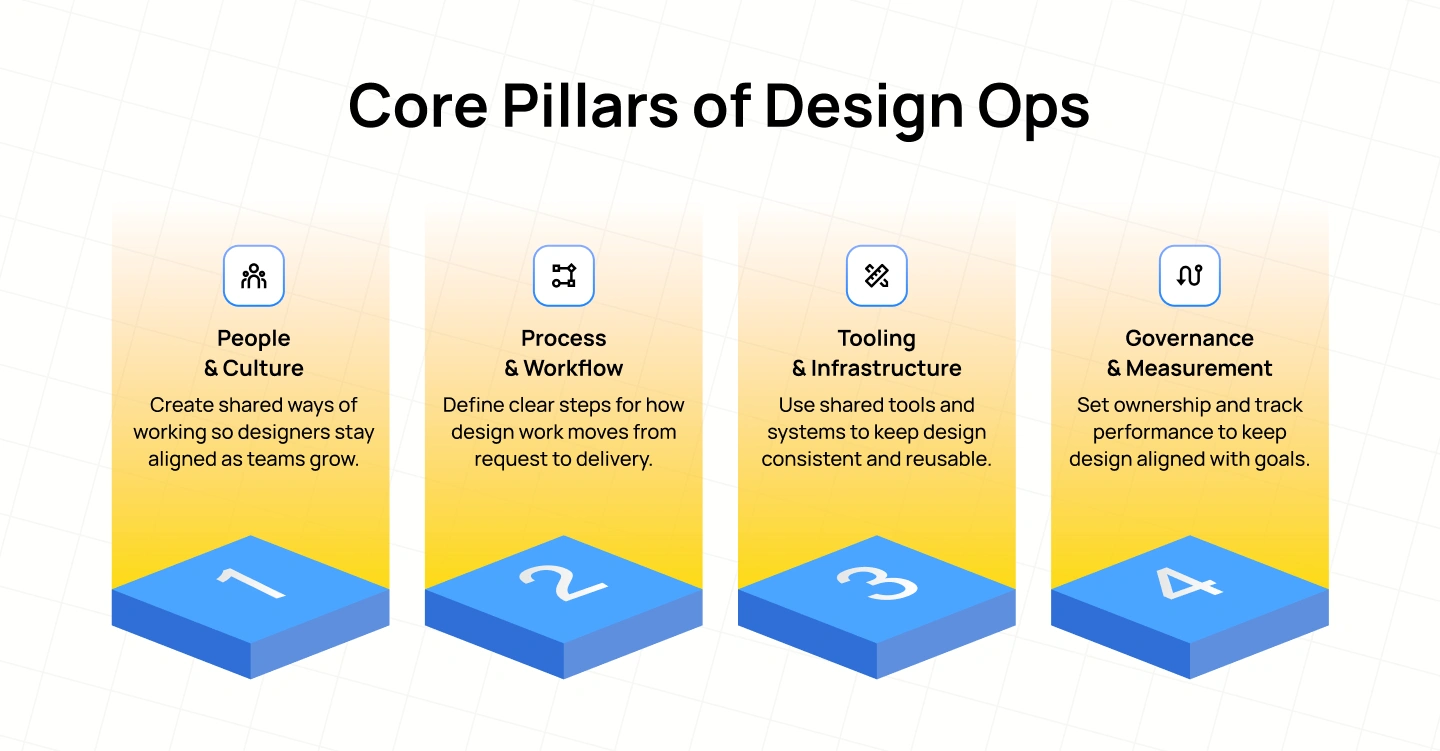 As teams scale, design stops being just a craft problem and becomes an operating problem. What determines speed and quality is no longer individual output, but how well people, workflows, tools, and decisions connect across the organization.
Design ops brings structure to this by organizing design into 4 interdependent pillars:
Scaling design starts with creating a shared understanding of how designers work and grow within the organization. Without this, each team develops its own norms, leading to inconsistent expectations and uneven quality.
A strong people-and-culture foundation ensures that designers join the team with clarity, grow through defined paths, and operate within shared rituals. Critiques, reviews, and leadership structures are not just practices, but mechanisms that keep decision-making consistent as the team expands.
As the number of projects increases, informal ways of working begin to break down. Requests arrive without context, feedback loops become unpredictable, and handoffs introduce delays.
Process and workflow define how work moves through the system. This includes how design is requested, how priorities are set, how feedback is structured, and how work is handed to engineering. When done well, it removes ambiguity and makes delivery repeatable without restricting creative exploration.
Tools shape how teams collaborate, but without alignment they quickly become a source of fragmentation. Different files, different versions, and different systems create confusion and slow down both design and engineering.
Tooling and infrastructure establish a shared environment where design decisions are stored, reused, and translated into production. Design systems, component libraries, and connected workflows between design and code ensure that what is designed can be built consistently across teams.
As teams grow, consistency cannot rely on informal agreement. It requires clear ownership, decision-making models, and a way to measure whether the system is working.
Governance defines who makes decisions and how contributions are managed, while measurement connects design work to business outcomes. Together, they ensure that design is not only efficient but also accountable and aligned with broader product and organizational goals.
Design ops usually becomes necessary when teams start to feel friction in how work gets done. Delivery slows down despite having more designers; similar work is repeated across teams, and designers spend more time aligning than designing.
This often happens as teams grow or begin managing multiple product lines. What used to work informally no longer scales, and coordination starts to break down. As a result, inconsistencies increase, and decision-making becomes harder to manage.
However, the need for design ops is not only tied to team size. If senior designers are spending a large part of their time on planning, alignment, and process-related work, it is a clear sign that the team needs a more structured way of operating.
The way design ops is implemented typically follows one of the models below:
In large organizations, many product teams work in parallel. Without a shared structure, each team tends to create its own patterns, tools, and workflows, which leads to inconsistency and rework.
This model separates responsibilities. A central design ops team sets standards, tools, and governance for the whole organization, while embedded roles in each product team apply those standards in daily work.
Example: The central team defines a design system, naming conventions, and handoff rules. Each product team has a Design Program Manager who ensures those standards are followed during feature development, so teams stay aligned without blocking each other.
In smaller teams, there are fewer people but many responsibilities. There is usually no dedicated design ops role, so coordination and process work are handled informally.
In this model, one person takes ownership to introduce structure where it is most needed. Instead of building a full system upfront, they focus on fixing the biggest pain points first.
Example: A senior designer notices repeated confusion in file organization and handoffs. They introduce a simple folder structure, basic component library, and regular design reviews. These small changes reduce rework and create a foundation the team can build on as it grows.
Introducing design ops does not require a complete overhaul. Most teams improve by addressing the biggest sources of friction first, then building structure gradually.
To make this more concrete, consider a common scenario: 3 product teams are working on similar features, but each creates its own components, naming conventions, and handoff approach. Engineering spends extra time resolving inconsistencies, and designers repeatedly revisit the same decisions.
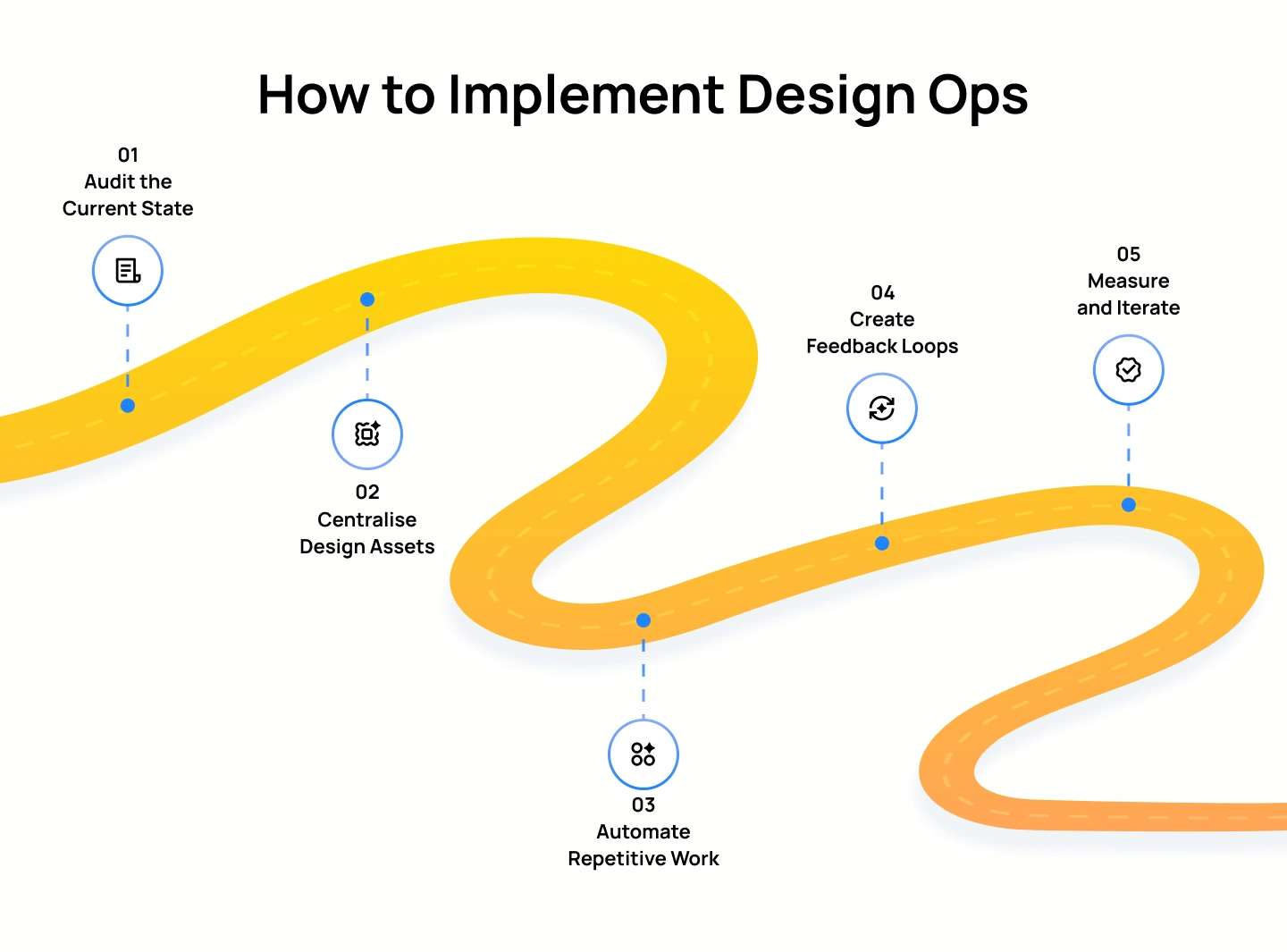
A practical way to address this is through a sequence of steps that gradually turn this fragmented setup into a coordinated system:
Before making changes, teams need a clear view of how work currently flows. This means reviewing how design requests come in, how work is prioritized, how files are structured, and how handoffs happen between design and engineering. The goal is to identify where delays, duplication, or confusion occur.
Example (continuing the scenario): The audit shows that the 3 teams have each created their own version of the same component, use different file structures, and follow different handoff practices, which leads to confusion and delays.
Once issues are identified, the next step is to create a shared system for design assets. This involves consolidating components, patterns, and design files into a single source of truth so teams are not working in isolation. It also requires defining clear standards for how assets are created, stored, and updated.
Example (continuing the scenario): The teams agree on one shared design system, standardize file structures, and move all components into a central library so each team can reuse the same assets instead of rebuilding them.
After standardizing assets, teams can reduce manual effort in recurring tasks. This includes setting up consistent naming conventions, automating asset exports, and aligning design outputs with engineering requirements. The focus is on removing tasks that do not require creative input but still consume time.
Example (continuing the scenario): Naming conventions and handoff formats are aligned across teams, so developers no longer need to interpret different files or recreate assets for each feature.
To keep the system working, teams need regular opportunities to review and improve how they collaborate. This means setting up structured feedback between design, product, and engineering, so issues are identified early, and decisions are shared across teams.
Example (continuing the scenario): The teams introduce regular cross-functional reviews to catch inconsistencies between components early, instead of discovering them during development.
Finally, teams need to track whether these changes are actually improving outcomes. This involves defining key metrics such as handoff time, component reuse, or rework, and using those insights to refine workflows over time.
Example (continuing the scenario): The teams track how often components are reused and how long handoffs take, then adjust their workflows to reduce delays and duplication further.
Design ops often feels intangible until it is measured. Its impact becomes clear when teams track how changes in workflows, tools, and collaboration improve delivery speed, reduce rework, and increase consistency.
To evaluate design ops properly, teams need to look at two dimensions: how efficiently work moves, and how effectively it contributes to business outcomes:
Operational efficiency focuses on delivery performance:
Operational effectiveness focuses on impact:
In practice, teams with mature design ops see measurable improvements such as:
The role of design ops is evolving from managing workflows to enabling systems that can operate with less manual coordination. AI is accelerating this shift by helping teams make decisions faster, reduce repetitive work, and maintain consistency across design and engineering.
In traditional setups, many design ops activities rely on manual coordination. Teams review requests, manage priorities, document decisions, and ensure consistency across tools, often through repeated communication and effort.
AI changes this by embedding intelligence directly into these workflows. Instead of relying on manual checks and alignment, systems can assist in prioritising, validating, and translating work in real time.
This shift is most visible in how everyday tasks are handled:
Design ops can improve how teams work, but when applied incorrectly, it often creates new friction instead of removing it. These pitfalls usually appear when teams focus on control, tools, or output without understanding how design actually operates.
Below are the most common ones to watch for:
Standardisation is meant to reduce duplication and improve consistency, but problems arise when teams apply the same rigid process to every type of work. Design work varies, from early exploration to final delivery, and each stage requires different levels of structure. When everything is forced into one process, teams either slow down or bypass it completely.
For example, requiring detailed documentation and approvals even during early concept exploration can delay progress and discourage iteration.
Tools are meant to support workflows, but when teams keep adding new tools without removing old ones, complexity increases instead of decreasing. Work gets scattered across platforms, and teams lose clarity on where to find the latest version of anything. This leads to duplicated effort and misalignment between design and engineering.
For example, design files may live in Figma, assets in shared drives, and feedback in Slack, making it difficult to track decisions or maintain consistency.
Even well-designed processes fail if they do not match how teams actually work. Design ops cannot be enforced purely through rules; it needs to fit into existing team behaviors and gradually evolve them. When culture is ignored, teams continue using their own informal ways of working, making new systems ineffective.
For example, introducing structured design reviews will not work if teams are used to giving feedback casually and see no value in changing that habit.
Many teams introduce design ops only after problems become visible. By that point, inconsistencies are already built into systems, tools, and workflows, making alignment much harder. Instead of preventing issues early, teams are forced to fix them retroactively.
For example, trying to unify multiple design systems created by different teams often requires redesigning components and retraining teams, which takes significant time and effort.
Without clear metrics, design ops lacks direction and accountability. Teams may introduce processes, but without measurement, they cannot tell whether those changes are improving anything. This makes it difficult to justify investment or identify what needs to be fixed.
For example, if teams do not track how long handoffs take or how often designs are reworked, they cannot identify bottlenecks or measure progress.
As teams grow, there is often pressure to produce more design work. However, increasing output does not guarantee better results if the underlying system is inefficient. Without design ops, teams may move faster but still produce inconsistent or low-quality outcomes.
For example, multiple teams may release features quickly, but inconsistencies in UI patterns create confusion for users and require additional fixes later.
Design ops is often mistaken for managing timelines, tasks, or deliverables. While it overlaps with project management, its role is broader. It focuses on improving how design work flows across teams, not just tracking progress within a single project.
For example, a project management tool can track deadlines, but it does not solve issues like duplicated components, unclear ownership, or inconsistent workflows between design and engineering.
Design ops is what allows growing design teams to move from reactive work to a structured, scalable system. Without it, adding more designers often increases complexity rather than improving outcomes.
At its core, design operations aligns people, processes, tools, and governance so design can operate consistently and contribute directly to business goals. This alignment is what turns design from a bottleneck into a competitive advantage.
As teams continue to grow, the role of design ops is also evolving. AI is accelerating how workflows are managed, how decisions are shared, and how systems stay consistent, making intelligent operations the new standard.
For teams experiencing the challenges of scale, the focus should not be on adding more resources, but on improving how design works as a system. This is where design ops creates lasting impact.
If you are looking to build or scale your product, Lollypop Design Studio can help. As a global UI/UX and product design agency, we design systems that balance speed with flexibility, so your product remains consistent, high-performing, and ready to grow.
From user research and interface design to full-scale design systems, our team works closely with you to align design decisions with your product and business goals. Get in touch for a consultation to explore how design ops can support your product at every stage.
Design ops is how a company structures and runs its design work. It defines how requests come in, how designers collaborate with product and engineering, and how outputs are delivered consistently. In practice, it reduces duplicated work, standardizes workflows, and ensures design decisions are reused instead of recreated across teams.
A team needs design ops when coordination starts to slow down delivery. This usually shows up as repeated work, inconsistent UI, or designers spending more time aligning than designing.
For example, if multiple teams are building similar components differently or handoffs to engineering are unclear, it is a clear signal that a structured system is needed.
A design system is a library of components, patterns, and guidelines. It defines what gets designed.
Design ops defines how that system is created, maintained, and used across teams. It ensures the system is actually adopted and integrated into workflows, not just documented.
Design ops ROI is measured through improvements in how teams work and what they deliver.
This includes faster handoffs, fewer duplicated components, reduced developer rework, and higher reuse of design system assets. It can also be seen in better alignment between design and business goals, and improved designer productivity.





