Online shopping has grown fast since the pandemic, and order volumes now spike during sales seasons. Many retailers still manage these orders with spreadsheets and disconnected tools. The result is errors, delays, and unhappy customers.
An Order Management System (OMS) solves this problem. But an OMS only works well when people can use it easily. This guide explains what an OMS is, why it matters, and how good UI/UX design makes it work better.
Key takeaways
An order management system (OMS) is software that tracks and automates every order from placement to delivery. It brings orders, inventory, shipping and returns into one central platform.
An OMS replaces spreadsheets and complex ERP workarounds. It handles high order volumes without overload or errors.
It manages orders from every sales channel, including:
With an OMS, businesses can speed up fulfillment, lower shipping costs, improve data accuracy and simplify picking and packing.
An OMS helps businesses work faster with fewer errors, and it gives customers a smoother shopping experience. It improves both operations and customer satisfaction at the same time.

UI/UX design improves both the customer experience and the efficiency of the teams behind it. A clear, intuitive design guides shoppers to buy and helps staff process orders faster.

Leading e-commerce companies have long invested heavily in UX design, not just advertising. A good experience turns first-time visitors into repeat buyers.
On the front end, user-centred design leads to:
Watch this short video to see a real-time OMS in action:
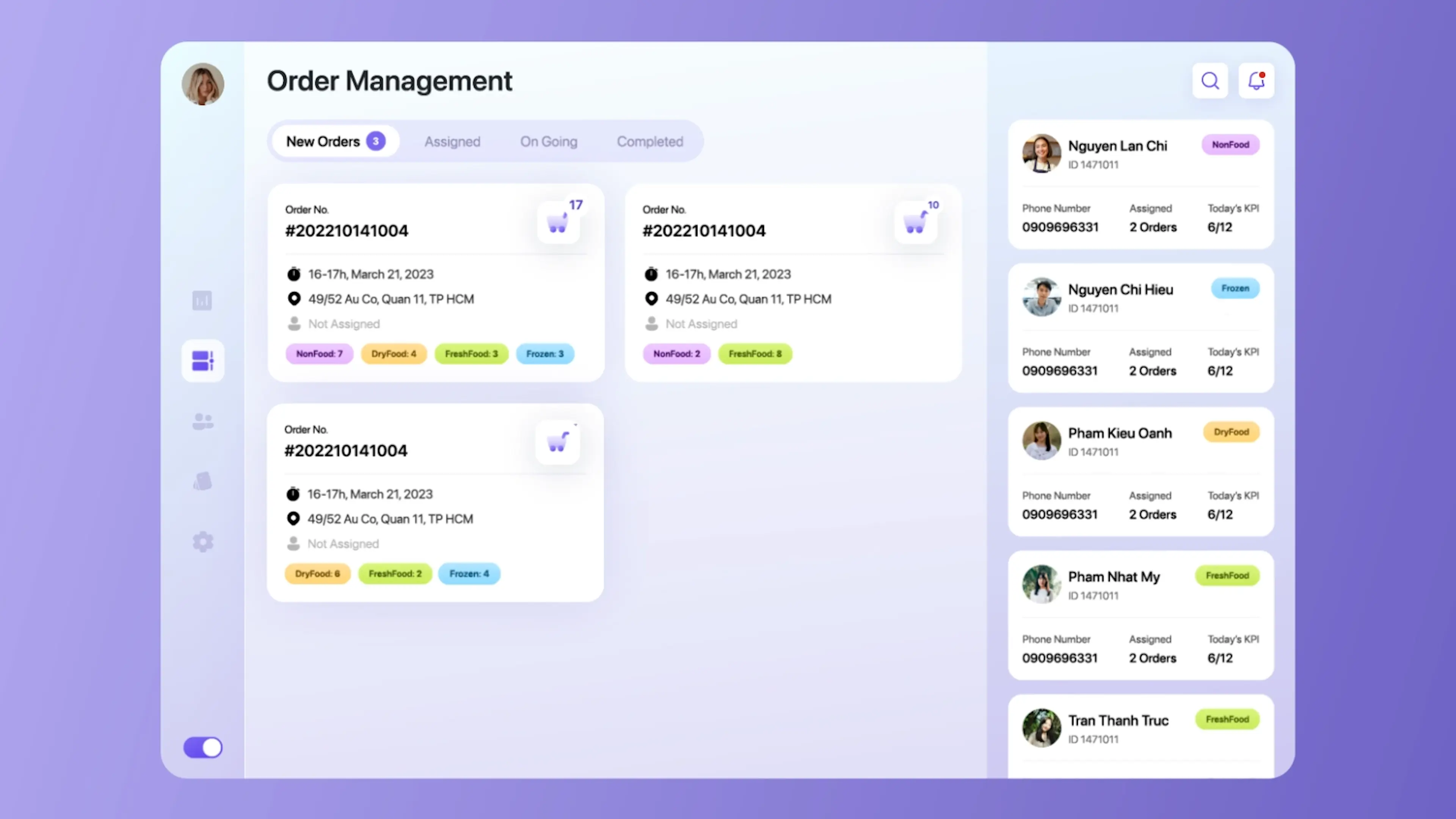
At Lollypop Design Studio in Vietnam, we research the daily challenges of large supermarkets. We then design user-centred OMS interfaces to fix slow workflows, manual tasks and outdated product data.
Key features we design include real-time order tracking, auto-assigned pickers, easy item management and real-time planogram (POG) maps. Together, they speed up fulfillment and raise customer satisfaction.
UI/UX design makes every OMS stage clear and easy to use, from order capture to reporting. It helps staff work faster and keeps customers informed at each step.

The table below shows how design improves each stage of an OMS:
| OMS stage | What good UX adds | Business result |
|---|---|---|
| Order capture | Simple product selection and short forms | Fewer errors, higher conversion |
| Order processing | Live stock alerts and clear status updates | Fewer cancellations |
| Fulfillment | Visual dashboards for picking and packing | Faster turnaround |
| Order tracking | Real-time status, delay reasons and next steps | Fewer support calls |
| Inventory | One synced view of stock across channels | No stockouts or overstock |
| Returns | Guided return steps and pickup options | Lower service costs, more trust |
| Reporting | Interactive dashboards and charts | Faster, data-driven decisions |
Order capture starts when a customer places an order. The OMS then alerts staff in real time.
An intuitive UI/UX design makes it easy to pick products, choose options, and enter details. Fewer errors at this stage build confidence and lift conversions.
Next, staff check stock, apply discounts, calculate shipping, and prepare the order. Live inventory data can warn customers when stock is low, which prevents cancellations.
Clear notifications and a simple “My Orders” page keep customers updated at every step.
Fulfillment covers picking, packing, and shipping. Most of it happens behind the scenes, but design still matters.
A clear dashboard and simple navigation help warehouse staff work faster with fewer mistakes. This turns a manual process into a digital one and speeds up delivery.
Today’s shoppers want to see their order status, shipping details and delivery date at any time. A user-centred OMS shows all of this in one place.
Managers can also track orders from every channel through their full lifecycle. If a delay happens, the OMS should show the reason and the fix right away.
Many retailers now sell the same product on websites, marketplaces and social media. This is a core part of omnichannel retail.
When one channel sells a unit, every other channel must update instantly. A well-designed OMS gives managers one clear view of stock, so they can prevent stockouts and cut costs.
Returns can be slow and complex. User-centred design turns them into a few simple steps: start the return, choose a reason and book pickup or drop-off.
This saves money, reduces the load on support teams and builds customer trust.

An OMS collects rich data on sales, stock and customer behaviour. Good design presents this data so teams can understand it at a glance.
With the right insights, an OMS can predict how much safety stock you need. This helps you avoid overselling and deadstock. Interactive dashboards and data visualization help teams spot trends and act quickly.
Is your order management slowing your team down?
Our UX team designs OMS dashboards and workflows that cut manual work and speed up fulfillment.
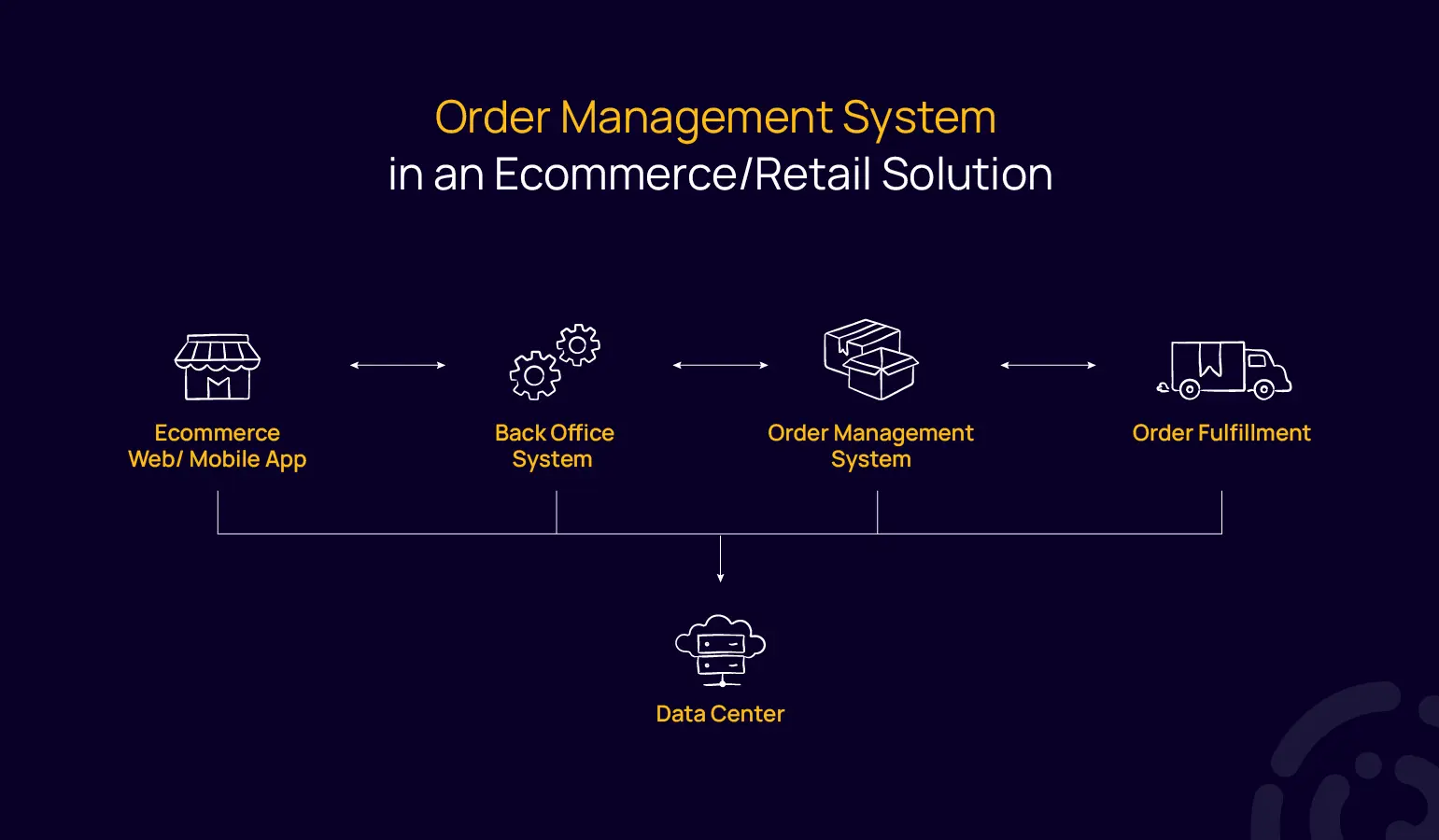
Connect your e-commerce website or app to your OMS and back-office tools. Product, price and stock data then update automatically everywhere.
Many businesses invest heavily in their e-commerce website or mobile app. But the back-office systems behind it matter just as much.
Large supermarkets face daily challenges such as:
Manual updates cause errors and waste time and money. An integrated system fixes this. Product data, shelf layouts and price changes update automatically across every platform.
At Lollypop Design Studio Vietnam, we transform retail operations through user-centric OMS design. We use an agile design process that fits each client’s resources.
We design interfaces that collect and connect data from every part of the business:
This data helps you forecast stock for peak seasons and find bottlenecks in fulfillment.
20–35%
Boost in order handling efficiency across all sales channels for large supermarkets in Vietnam using our OMS designs.
An order management system (OMS) is software that tracks and automates every order from placement to delivery. It brings orders, inventory, shipping and returns into one central platform across all sales channels.
Key OMS features include order capture, order processing, fulfillment, real-time tracking, inventory management, returns management, and reporting and analytics.
UI/UX design makes each OMS stage clear and simple. It reduces errors, speeds up staff workflows, keeps customers informed and presents data in easy-to-read dashboards.
An ERP manages the whole business, including finance, HR and supply chain. An OMS focuses on orders, from checkout to delivery and returns, and often connects to the ERP.
An OMS helps e-commerce businesses handle high order volumes without errors. It keeps stock accurate across channels, speeds up delivery and improves customer satisfaction.
Ready to build an OMS your team will love using?
Talk to Lollypop Design Studio Vietnam about UX/UI design for your e-commerce and retail operations.