When Anthropic launched Claude Design, the headlines wrote themselves: “Figma killer.” They always do. After six months of running both tools in live client work, our conclusion is less dramatic and more useful: Figma and Claude Design are not solving exactly the same problem. They sit at different points in the design process, and the real question is not which tool wins. It is where each tool earns its place.
For design teams, that distinction matters. Claude Design can turn a brief into a visual direction or working prototype quickly. Figma remains deeply useful when the work needs precise visual craft, governed design systems, collaborative review, and a file that another team can continue to build and maintain. The workflow can involve both rather than treating one as a replacement for the other.
Below, we break down five differences that change how design teams work, using the same practical lens we use in the studio. Each section also calls out where Figma fits, where Claude Design fits, and the trade-off worth knowing before you commit to a workflow.
Claude Design is a product from Anthropic Labs that lets you collaborate with Claude to create, explore, and refine polished visual work, including designs, prototypes, presentations, one-pagers, and more. Anthropic launched it in April 2026 as a research preview for eligible Claude subscribers.
It is designed to help people explore ideas and produce polished visual outputs from a prompt and supplied context. Anthropic currently supports organization-scoped sharing, exports to PDF, PPTX, Canva, and standalone HTML, as well as handoff to Claude Code. Anthropic also highlights use cases including branded decks, one-pagers, social graphics, mockups, and prototypes.
That makes Claude Design closer to an AI-first exploration and production environment than a conventional canvas-first design tool. The difference becomes clearer when you compare it with Figma.
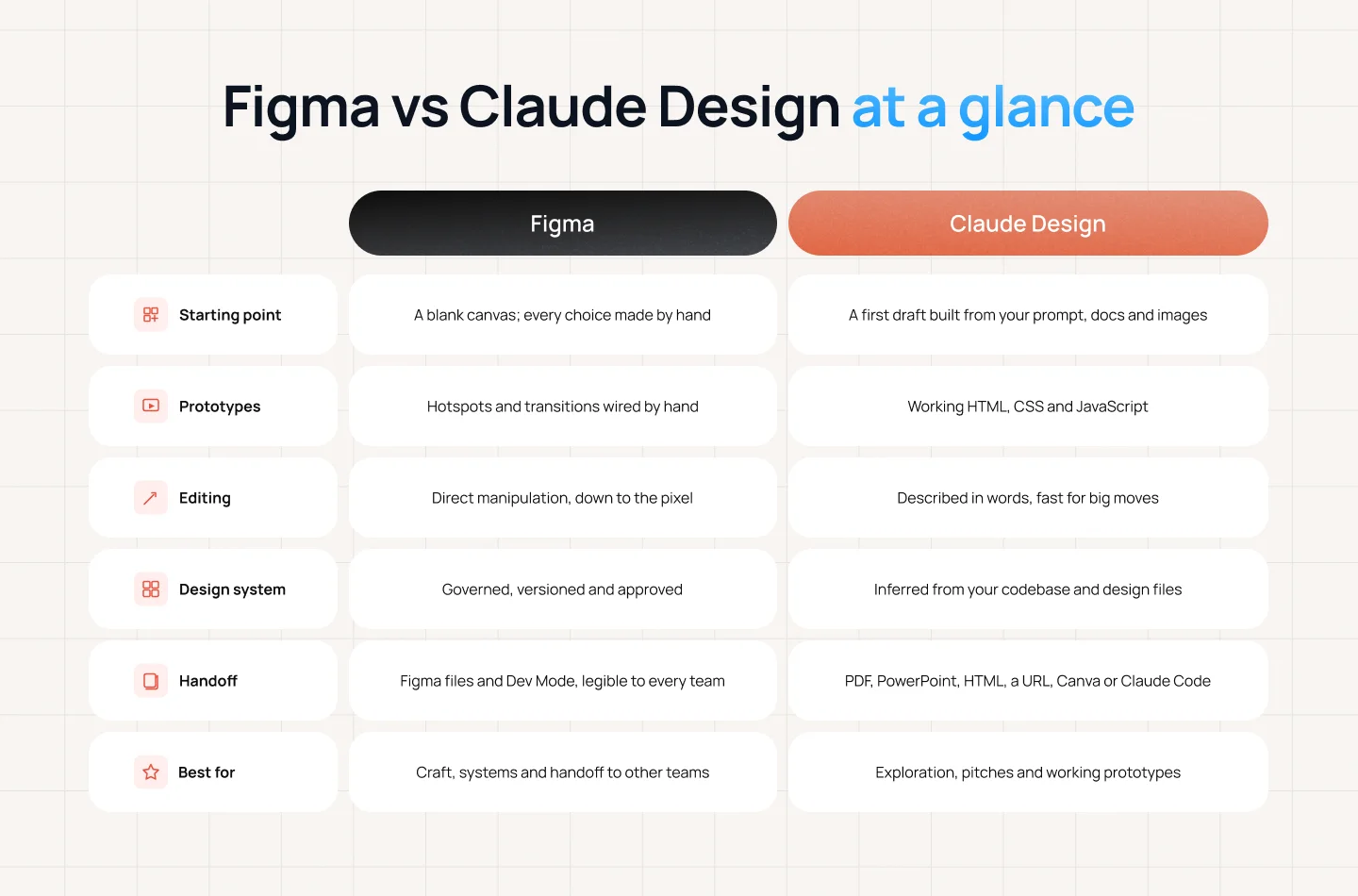
The comparison above shows how differently Figma and Claude Design approach the design process. But the more interesting question is what those differences mean for the way designers actually work.
When the starting point changes, so does the role of the designer. The next five differences look beyond features to examine how these two workflows shape exploration, iteration, prototyping, and decision-making.
Figma opens empty, and that emptiness is part of the value. Every decision, from the first frame onward, is deliberately made by the designer. That can feel slower, but the slowness creates room for taste, judgment, and exploration before the team is anchored to a particular answer.
Claude Design opens with an answer. You describe what you want, provide the relevant context, and a first visual answer appears. Instead of creating the first artifact yourself, you react to one. That can be especially useful when a team needs several directions before a meeting or wants to make an abstract discussion concrete.
For example: A client is unsure whether a new feature should feel editorial, utility-led, or premium. Claude Design can quickly turn those three directions into tangible artifacts, giving the team something to compare before production begins. The value is not that the first output is final; it gives the conversation something concrete to react to.
Figma is better when the question is still genuinely open and the answer needs to come from a person. Early concept work where the wrong first draft is worse than no draft, because anchoring is real and teams rarely escape the first thing they see.
Claude Design is better when you need five directions before a lunch meeting. Pitch work, stakeholder alignment, anything where the goal is to make an abstract conversation concrete quickly enough that the conversation stays alive.
The honest trade-off: Reacting to a first draft can be faster than originating one. Both approaches matter; the skill is knowing when to generate options and when to protect the blank canvas.
A Figma prototype is a representation — an extremely good one, but a simulation. Hotspots, transitions, and states that someone wired by hand. It shows what the product will feel like; it is not the product.
Claude Design outputs real HTML, CSS, and JavaScript. The prototype is a small working version of the thing. It can hold actual state, respond to actual input, and be handed off as a bundle that Claude Code picks up and builds against.
This matters most in user testing. A participant interacting with something that genuinely responds behaves differently from one clicking through a slideshow, and you learn different things.
For example: A product team is testing a new onboarding flow where the experience depends on how users respond to different inputs. A working prototype can reveal how that interaction feels when the interface actually responds, while a Figma prototype may be enough when the team is testing the flow, hierarchy, or overall experience. The right level of fidelity depends on what the team needs to learn.
Figma is better when you need to communicate intent precisely without committing to an implementation. Motion specs, state matrices, and the many interface states that are quicker to draw than to build — error, empty, loading, permission-denied.
Claude Design is better when the idea only makes sense when it works. Anything with real interaction logic, data behavior, or a feel that a click-through cannot fake. It closes the gap between “looks right” and “is right.”
The honest trade-off: A working prototype can help you learn more about how an idea actually behaves, but it also brings implementation questions into the conversation earlier. Sometimes you need that. Sometimes you don’t.
This is one of the most immediate differences in day-to-day use. In Figma, a designer can see a button, select it, and move it three pixels. The eye and hand form a tight feedback loop. Small adjustments can be made because the designer does not need to describe every visual intention in language.
Claude Design uses a different interaction model. You describe the change and iterate. That is powerful for large moves — restructuring a page, trying a new hierarchy, changing the tone of a layout, or generating multiple variations — but it can feel less direct for tiny visual adjustments.
Instruction is a looser loop. It is dramatically faster across large moves and frustrating across small ones. The cost curve is the inverse of direct manipulation’s, which is exactly why the two tools feel so different to use.

For example: A designer is reviewing a nearly finished interface and notices that a button feels slightly too far from the headline. In Figma, they can move it immediately and judge the result in context. In Claude Design, they need to describe the adjustment, review the output, and potentially iterate again. That difference may be negligible during early exploration but becomes much more noticeable as the work moves into the final stages of visual refinement.
Figma is better when craft is the deliverable. Final visual design, typographic detail, optical alignment, the last ten percent that separates competent from good. Also anything a client will review line by line.
Claude Design is better when the layout matters more than the pixel. Structure, hierarchy, flow, and volume of options — the stage where moving a button three pixels is procrastination rather than progress.
The honest trade-off: Figma has the edge in pixel-level control today, and that matters when craft is the deliverable. But this is also the gap most likely to narrow as AI design tools improve. We would not build a three-year strategy around assuming that advantage will last.
Figma’s system layer — variables, components, modes, published libraries — is slow to build, and the slowness is governance. Someone decided this scale, approved that component, and versioned that change. A mature library is an organizational agreement that happens to be stored in a design tool.
Claude Design builds a system by reading your codebase and design files, then applies it. That is genuinely useful, and it closes a gap most teams live with: the library said one thing, production shipped another, and the design file was quietly wrong for eight months.
But inferred is not the same as decided. A system derived from what exists encodes your inconsistencies alongside your intentions, and it has no opinion about which is which.
For example: A product team may have an established design system, but its live product and design files may have drifted over time. An AI tool can use those existing materials to create new work that looks consistent with what is already there. But if the team needs to decide which version is actually the standard, what should be deprecated, or which component should become the source of truth, that still requires a human decision.
Figma is better when multiple teams depend on the same components and someone must be accountable for a change. Governance, versioning, deprecation, and the ability to answer “who approved this.”
Claude Design is better when you need on-brand output from people who are not designers, today. Marketing collateral, internal decks, one-pagers — the long tail of work that used to arrive off-brand or land in a designer’s queue.
The honest trade-off: Claude Design can help teams apply the design patterns they already have, but it cannot decide which patterns should become the standard. That decision still belongs to the people who manage the design system.
Figma’s real moat was never its feature list. It is gravity. Near-universal adoption in software design means the file you produce is legible to every developer, every agency, every new hire, and every vendor you will ever work with. Dev Mode, annotations, plugins, the community — that is infrastructure, and infrastructure is hard to leave.
Anthropic’s Claude Design documentation lists exports including PDF, PPTX, standalone HTML, and Google Slides, as well as connections to tools such as Canva. It does not currently list direct Figma export (*).
For a studio whose clients treat Figma as the source of truth, that is not a quibble — it is the single most-cited blocker, and we have felt it. Work that begins in Claude Design and must end in Figma gets rebuilt, and rebuilding is where velocity goes to die.
The counterweight is that Claude Design can send work in the directions clients actually consume. A design can be exported as PDF, PPTX, or standalone HTML, shared through an internal URL, sent to connected tools, or handed off to Claude Code. For a marketing deck, that is a useful set of exits.
For example: A team might use Claude Design to create a presentation for a client, then export it as a PowerPoint or PDF for review. If the same work later needs to become a production interface that another designer or developer will maintain in Figma, however, the team may need to rebuild it there. The export works well when the artifact is the final deliverable; it is less useful when the output needs to become a Figma source file.
Figma is better when the output has to survive a handoff to people you do not control — engineering teams, other agencies, the client’s in-house designers. Interoperability beats capability in a multi-vendor project.
Claude Design is better when you are the last stop before the audience. Decks, proposals, microsites, prototypes for research — where the deliverable is the artifact itself rather than a specification of one.
The honest trade-off: This is the difference to check first when deciding on a production workflow. It is primarily a question of where the work needs to live after exploration, not a universal statement about design quality.
(*) Claude’s export capabilities may change over time. This information reflects the export options publicly documented by Anthropic at the time of publication. Last updated: September 2026.
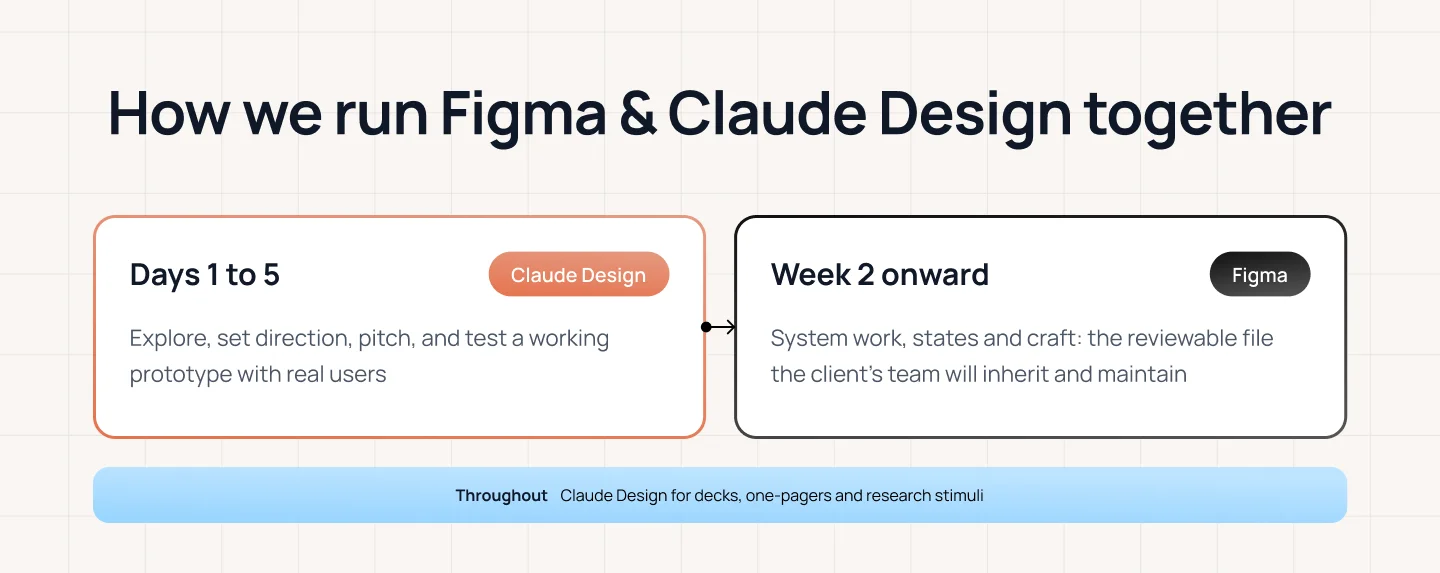
After six months of live client work, our workflow is not “Figma or Claude Design.” It is a staged process in which each tool is used for the kind of work it handles most naturally.
DAYS 1–5 — Claude Design. Exploration, direction-setting, the pitch. Enough working prototype to put in front of users and learn something real before anyone commits.
WEEK 2 ONWARD — Figma. The actual design. System work, states, craft, the reviewable file. Everything the client’s team will inherit and maintain.
THROUGHOUT — Claude Design again for the surrounding material. Decks, one-pagers, research stimuli — which used to consume more designer time than anyone wanted to admit.
For example: A team might start a new product project by exploring several directions in Claude Design, using a working prototype to put an idea in front of users before committing to a direction. Once the direction is clear, the actual design moves into Figma, where the team works on the system, states, craft, and the reviewable file the client’s team will inherit and maintain. Claude Design can then be used again for the surrounding material, such as decks, one-pagers, and research stimuli.
For most design teams today, Claude Design is more likely to complement Figma than replace it. The uncomfortable part is that some of what our industry has traditionally called “design” is already becoming much cheaper to produce.
A meaningful share of what our industry has billed as “design” was really producing artifacts to think with. Mockups to agree on a direction. Decks to sell it. Prototypes to test it. Useful work, genuinely — and work that is getting very cheap, very quickly.
What does not get cheap is judgment: knowing which of five directions is right, what a system should refuse to allow, when a three-pixel adjustment matters and when it is avoidance. Claude Design has compressed the distance between an idea and something you can react to. Figma remains where design becomes a product someone else can build and maintain.
Neither of those is the interesting part of the job. The interesting part was always the deciding — and that has not moved.
The difference between Figma and Claude Design is less about which tool has more features and more about how the design process starts, evolves, and ends.
Claude Design makes it faster to turn an idea into something you can see, react to, test, and share. Figma remains deeply embedded in the part of the process where design needs to be refined, governed, reviewed, and handed off to people who will build and maintain it.
The bigger shift is happening around the economics of design work itself. As AI makes mockups, decks, prototypes, and other artifacts cheaper to produce, the value of knowing what to make, what to change, and what to leave alone becomes more visible.
That shift is part of a broader change in how digital products are designed and discovered. If you’re exploring how AI is changing the way people find and evaluate information, read our guide to AI Search vs SEO. And if you’re building AI-powered products, What Is AI Validation? looks at how teams can validate AI experiences beyond whether the technology simply works.
The tools will keep changing. The design process will keep evolving with them. What matters is knowing where each tool creates leverage — and where human judgment still needs to lead.
If you’re building a digital product and need help turning that judgment into a scalable experience, explore Lollypop’s UI/UX design services, including design systems and digital prototyping, or talk to our team about your next product.
Claude Design is Anthropic’s AI design tool for creating visual work such as designs, interactive prototypes, one-pagers, landing pages, and other visual experiences through conversation with Claude. You can provide context such as documents, images, screenshots, codebases, and design systems, then refine the result through chat, comments, or direct canvas editing.
Neither tool is simply better across every stage of the design process. Claude Design is particularly useful for exploration, rapid prototyping, pitches, and visual work that needs to be created and shared quickly. Figma remains useful when teams need detailed visual control, governed design systems, collaborative production files, and established handoff workflows.
For most design teams today, Claude Design is more likely to complement Figma than replace it. Claude Design makes exploration and prototype production faster, while Figma remains deeply embedded in production design, system governance, and handoff. The boundary may change as both tools evolve, but the more useful question today is which tool fits each stage of the workflow.
At the time of writing, Anthropic’s Claude Design documentation does not list direct Figma export. It currently lists exports to PDF, PPTX, Google Slides, standalone HTML, and ZIP, as well as connections to other tools and handoff to Claude Code. Export and integration options may change over time, so check Anthropic’s latest documentation before relying on a specific format or integration.
For teams whose workflow includes both rapid exploration and detailed production design, using both can make sense. In our workflow, Claude Design is used early for exploration, direction-setting, pitches, and working prototypes; Figma takes over for the actual design, system work, states, craft, and the reviewable file the client’s team will inherit and maintain. Claude Design can then return for surrounding materials such as decks, one-pagers, and research stimuli.