When updating a landing page or publishing new content requires developer support, a website’s content management system may no longer meet the team’s needs. Choosing a different CMS, however, is not always the answer. Businesses need to understand whether their challenges come from the platform itself, the way content is structured, or the publishing workflow.
This guide compares traditional, headless, and hybrid CMS approaches to help you identify the right solution for your team’s needs, technical resources, and long-term plans.
A content management system (CMS) allows teams to create, edit, organize, and publish website content without building every page from scratch. CMS development goes beyond setting up a platform. It involves structuring content, designing reusable page templates, configuring editing workflows, and integrating the tools a business needs to manage its website effectively.
For businesses whose content needs are growing, the challenge is not simply finding a CMS that works. It is building a system that lets marketing teams publish efficiently, gives developers room to extend functionality, and supports future changes without unnecessary rework. The right CMS development approach depends on how a business manages content, who needs to access it, and how the website is expected to evolve.
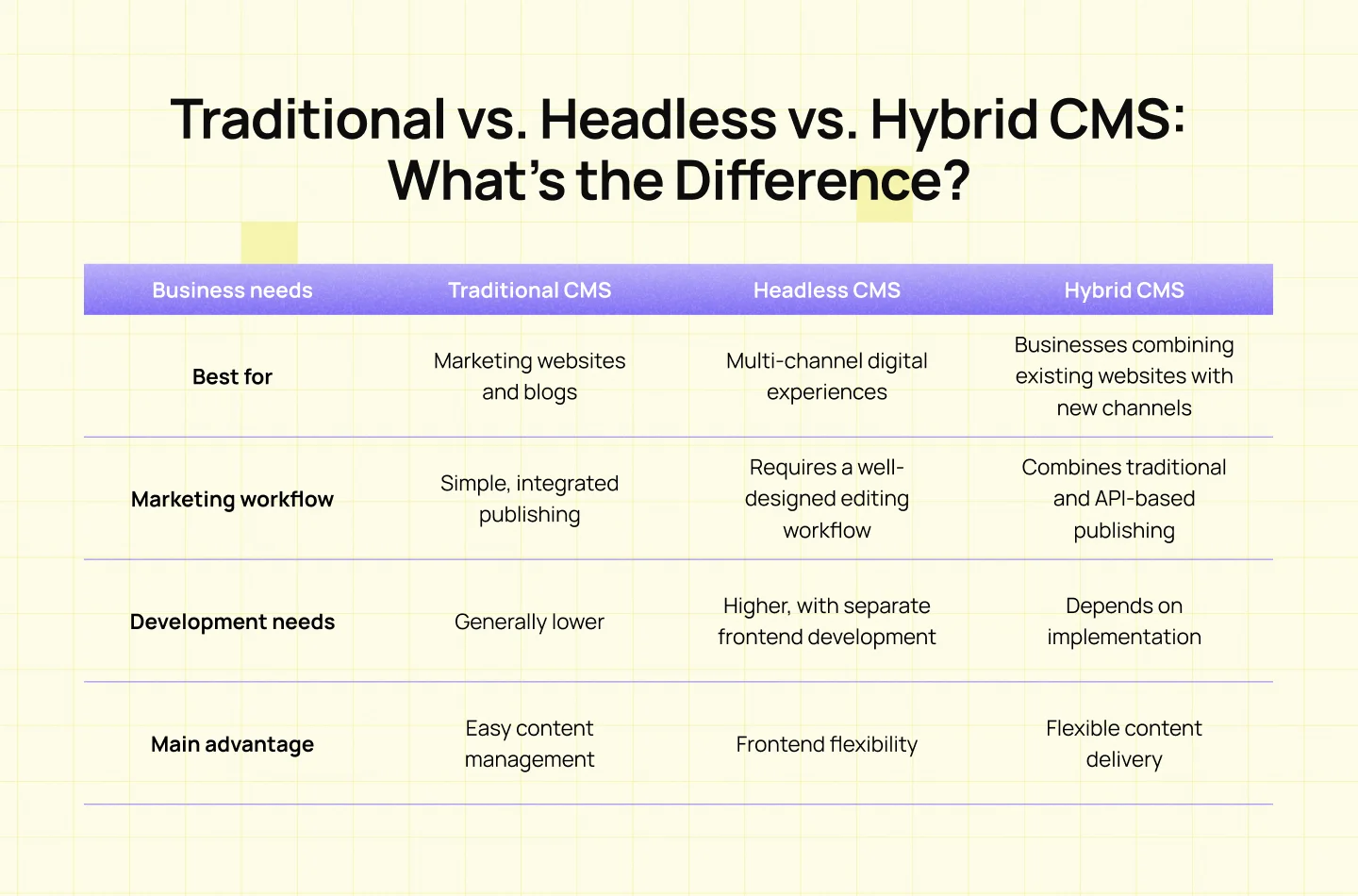
Before choosing a CMS, consider whether your current challenges come from the platform itself or the way content is managed. If your team mainly needs a simpler publishing workflow, improving your existing CMS may be enough. If you need greater frontend flexibility or content delivery across multiple channels, a headless or hybrid approach may be worth considering. The goal is to choose a system that supports your business needs without adding unnecessary complexity.
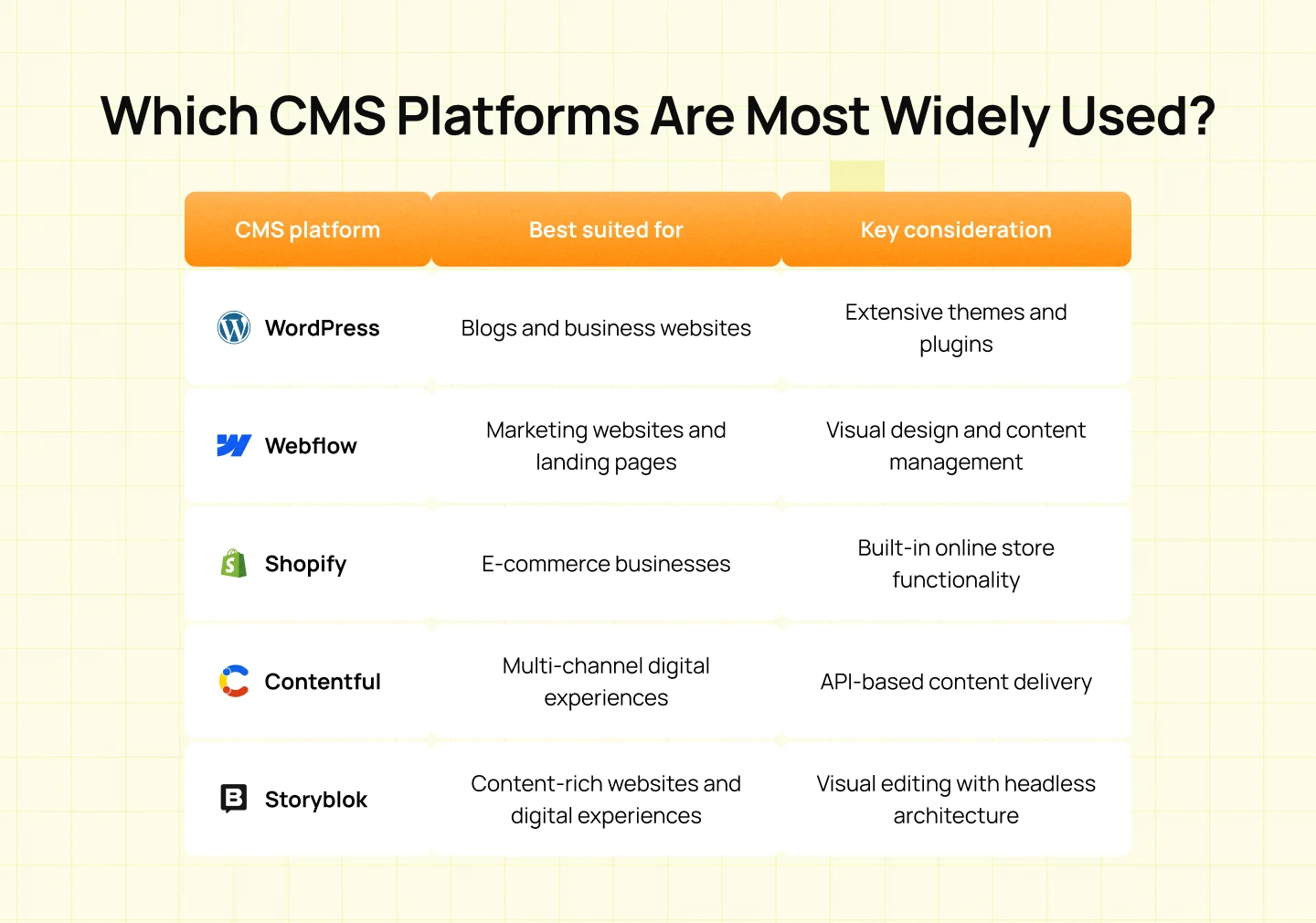
Platform popularity alone should not determine your choice. Consider how well a CMS supports your team’s publishing workflow, the features your website requires, and the resources needed to maintain it before committing to a platform.
CMS development involves more than setting up a platform. It requires planning how content is organized, how teams manage updates, and how the website will function as business needs evolve. The process typically involves the following stages.
Start by defining the website’s business goals, content needs, and technical requirements. Identify the types of content the team needs to manage, who will use the CMS, and which tasks they need to complete. This helps establish the scope of the project and ensures the CMS supports both business objectives and day-to-day publishing needs.
Organize content into reusable structures with clearly defined fields and relationships. Then, plan how editors will create, update, preview, and publish content through the CMS. An intuitive editing interface and flexible page templates help marketing teams manage routine updates independently while maintaining design consistency.
Build the frontend, page templates, reusable components, and functionality required by the website. Depending on business needs, the CMS may also connect with tools such as CRM systems, analytics platforms, and marketing automation software.
If replacing an existing CMS, migrate website content, review metadata, and map URLs to help preserve SEO performance. Before launch, test the website’s functionality, responsiveness, accessibility, and performance to identify issues that could affect users.
After launch, keep the CMS updated, maintain integrations, and address security requirements. Review publishing workflows regularly to identify bottlenecks and ensure the system continues to support the business as its website and content needs evolve.
A well-defined development process helps ensure that every stage aligns with business goals and user needs. Learn more about Lollypop’s design process and how each stage contributes to building effective digital experiences.
Choosing the right CMS starts with understanding what your business needs from its website and how your team manages content. Rather than choosing a platform based on popularity alone, evaluate how well it supports your workflows, technical capabilities, and future plans.
Identify the features your website genuinely needs, such as reusable page templates, multilingual content, or publishing across multiple channels. Distinguish essential requirements from optional features to avoid unnecessary complexity.
Consider who will manage the CMS after launch and how much technical support they can access. A suitable platform should enable content editors to handle routine updates efficiently while giving developers the flexibility to maintain and extend the website when needed.
Before committing to a platform, test common tasks such as creating a landing page, updating content, and publishing changes. This helps reveal usability issues and workflow limitations that may not be obvious from a feature list or product demonstration.
CMS development costs vary depending on the platform, project scope, and level of customization. Businesses should consider both the initial investment and the ongoing costs of operating and maintaining the system.
Several factors influence the overall development budget:
Beyond the initial build, businesses should account for recurring expenses that affect the total cost of ownership:
A lower initial development fee does not necessarily mean a lower overall cost. A CMS that requires frequent developer support or makes routine publishing difficult can create additional expenses over time.
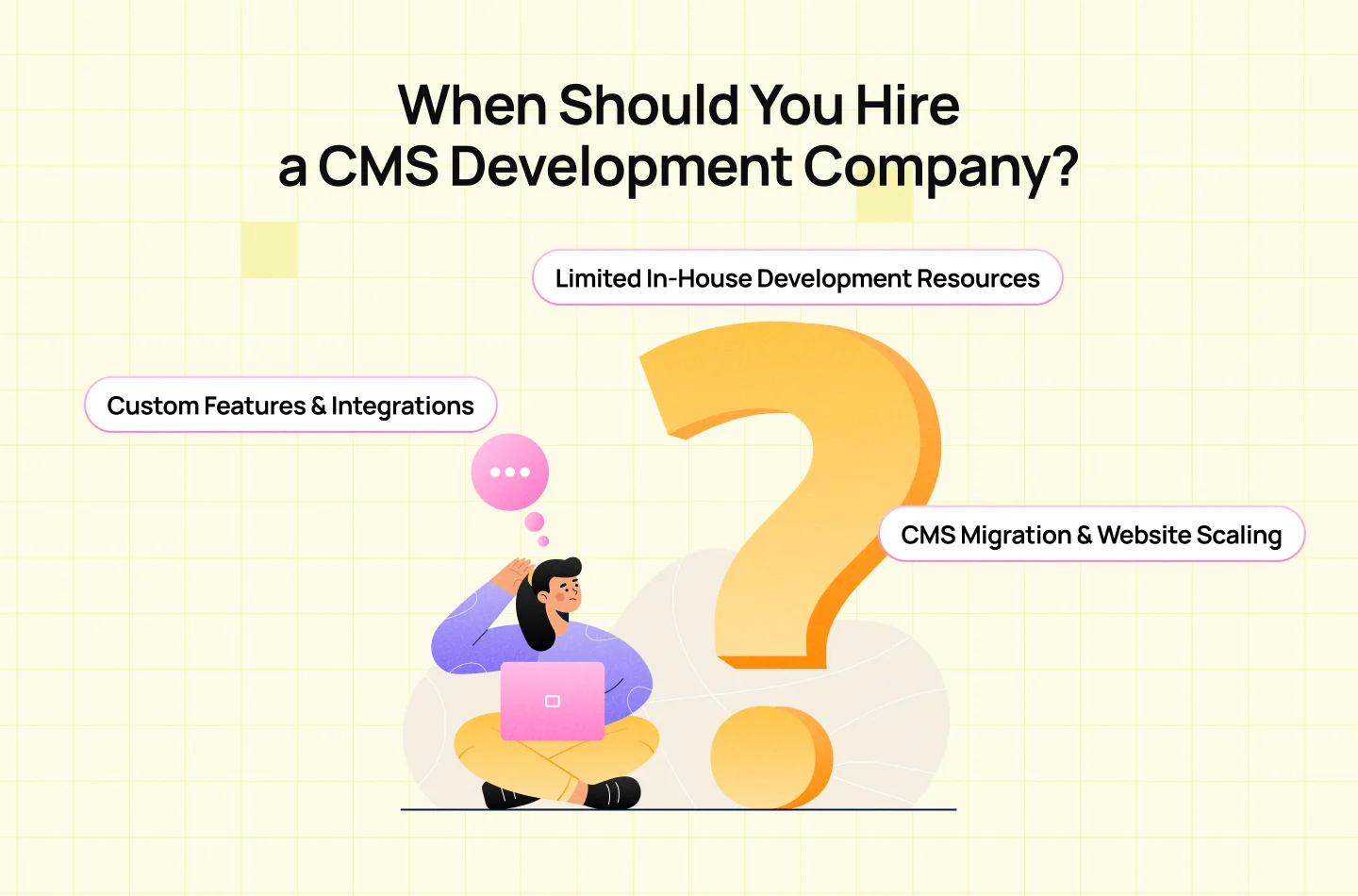
Standard CMS features may not meet every business requirement. Websites that need custom content structures, advanced publishing workflows, or integrations with CRM systems and marketing tools may require additional development. A CMS development company can help implement these capabilities while ensuring the system remains manageable and scalable.
Businesses without in-house expertise in CMS architecture, frontend development, or system integrations may struggle to implement and maintain a CMS independently. Working with a development partner provides access to the technical skills needed to build and configure the system, while helping internal teams manage and publish content more efficiently.
Migrating to a new CMS involves more than transferring content. Businesses may need to restructure content, configure URL redirects, preserve SEO performance, and test existing integrations. A CMS development company can help manage these technical requirements and prepare the website to accommodate future growth, new features, and changing content needs.
If you need support with CMS implementation, website design, or development, explore Lollypop’s services to learn more about the solutions available for your business.
Choosing the right CMS is about more than selecting a platform. It requires understanding how your team manages content, what your website needs to support, and how your digital experience may evolve over time. Traditional, headless, and hybrid CMS architectures each offer different advantages, so the right approach depends on your business goals, technical resources, and publishing requirements.
A well-planned CMS development process helps align content structure, editing workflows, and website functionality with these needs. By evaluating these factors before committing to a solution, businesses can build a CMS that supports efficient content management today and adapts to future growth. Looking to build or improve your CMS? Talk to Lollypop to explore an approach that fits your business needs.
A CMS is a platform that allows teams to create, manage, and publish website content. CMS development involves configuring or customizing that platform, structuring content, building page templates, and integrating the tools needed to support a business’s website and publishing workflows.
Not necessarily. A traditional CMS is often suitable for websites that need an integrated content management and publishing experience. A headless CMS offers greater flexibility for delivering content across multiple channels but typically requires more frontend development. The right choice depends on your website requirements, publishing workflows, and technical resources.
Yes, but a CMS migration requires careful planning to protect existing SEO performance. Businesses should preserve relevant URL structures or configure redirects, migrate metadata, maintain important content, and test the new website before launch. Poorly managed migrations can lead to broken links, indexing issues, and traffic loss.
CMS development costs depend on the platform, level of customization, design requirements, content migration, and third-party integrations. Ongoing expenses, including hosting, subscriptions, maintenance, and future enhancements, should also be considered when evaluating the total cost of ownership.
A CMS development company may be helpful when your website requires custom features, complex integrations, or a migration to a new platform. It can also provide technical expertise when your internal team lacks the resources to manage CMS development and maintenance independently.